

This issue occurs when the Tax Periods and Financial Periods do not align exactly. Even a one‑day difference can cause transactions to fall outside the expected VAT period. If Include Late Posting is not enabled, the VAT return will not pick up these transactions, which can make the return appear incomplete.
Why This Happens
iplicit uses two separate calendars:
- Financial Periods – used for accounting and posting
- Tax Periods – used for VAT reporting
If these do not match perfectly, transactions may be treated as late postings.
Without Include Late Posting enabled, these transactions are excluded from the VAT return estimate.
How to Resolve
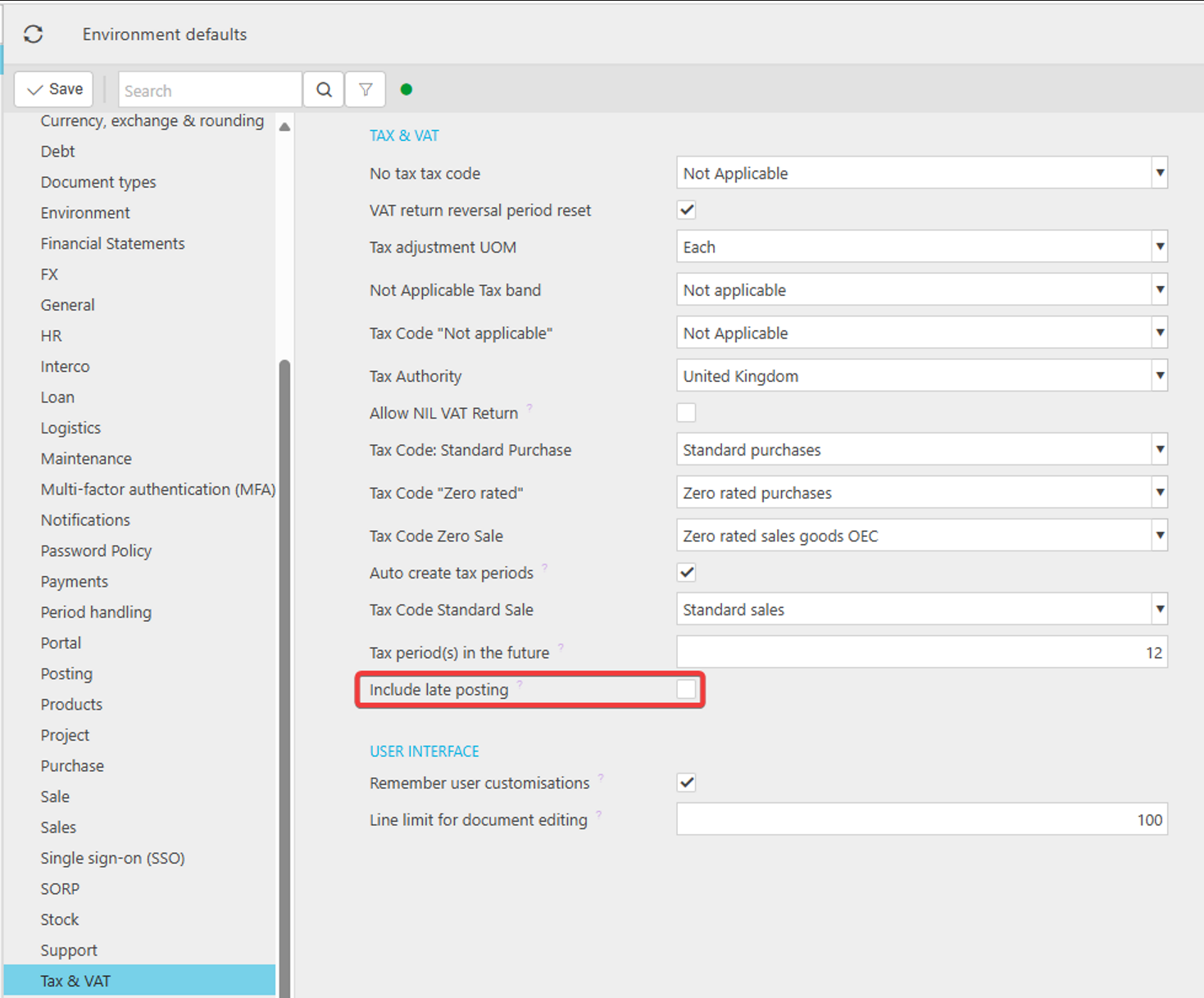
- Navigate to Environment Defaults.
- Scroll to the Tax & VAT section.
- Tick Include Late Posting.
- Click Save.
Once this setting is enabled, return to your VAT return and select Estimate again.
The VAT return will now include all relevant transactions, including those that previously fell outside the aligned periods.
Example Scenario
A transaction dated 28 September is entered late — for example, on 5 October against the October accounting period.
Because the invoice date falls before the current VAT period, but has not been included in a previous VAT return, it must be included in the September VAT return.
If Include Late Posting is not enabled:
- The September VAT return will ignore this September dated transaction as it is posted in October period.
- The return will appear incomplete
Once Include Late Posting is enabled and the VAT return is re‑estimated, the September transaction will correctly appear in the September VAT return.
Additional Notes
This setting affects VAT reporting only
It does not change the posting period of the transaction.
It simply ensures the VAT return captures all relevant items.
Useful for late‑received invoices
If your organisation often receives invoices after month‑end, enabling this setting ensures they are still included in the correct VAT return.
If a transaction still doesn’t appear
Check the following:
- The transaction is posted (drafts are ignored)
- The Tax Code is valid and linked to the correct Tax Group
- The transaction hasn’t already been included in a previous VAT return
- The VAT return is in Draft and Estimate has been re‑run after changes
Transaction not in VAT return
Missing from Tax Return
Document not on Tax Return
VAT return missing transactions
VAT return incorrect
_______________________________________________________________________________________