

The method you use to correct a bank transfer depends on whether the transactions have already been matched in a submitted bank reconciliation. This article covers both correction methods within the Bank Transfer module: unposting a transfer that has not been reconciled, and reversing a transfer that has already been matched.
How to correct a bank transfer that has not been reconciled
If the bank transfer has not been matched in a submitted bank reconciliation, you can unpost it and make changes directly. You need the relevant user permissions to access corrections.
- Open the bank transfer
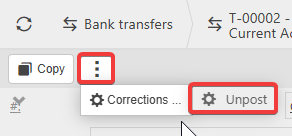
- Select the ellipsis (three-dot) menu
- Select 'Corrections'
- Select 'Unpost'
- Confirm by selecting 'Unpost' again
The bank transfer returns to draft status. From here you can edit the transfer - including the period - or abandon it entirely. Once corrected, repost the transfer.
How to correct a bank transfer that has already been reconciled
If the bank transfer has already been matched in a submitted bank reconciliation, you cannot unpost it. Instead, create a new bank transfer with the opposite effect to cancel out the original, then post the correct transfer.
- Post a new bank transfer for the same amount and period as the original, but with the 'from' and 'to' accounts swapped - this cancels out the original transfer
- Post a second new bank transfer with the correct details (correct period, accounts and amount)
- Match all three transactions in your next bank reconciliation:
- The original transfer - the initial money movement
- The cancelling transfer - offsets the original
- The corrected transfer - reflects the accurate transaction
All three documents must be reconciled together to keep the bank reconciliation balanced.
Correct bank transfer
Amend bank transfer
Bank transfer incorrect
Bank transfer correction