

Foreign Currency Revaluation is a common accounting process for restating the value of your foreign currency balances by comparing the exchange rates at the time of creation of the foreign currency transaction to the rate that applies at the date of revaluation.
To perform a FX revaluation in iplicit to revalue your bank account to the latest currency exchange rate and generate manual journals to move the difference in currency variance general ledger code, follow these steps:
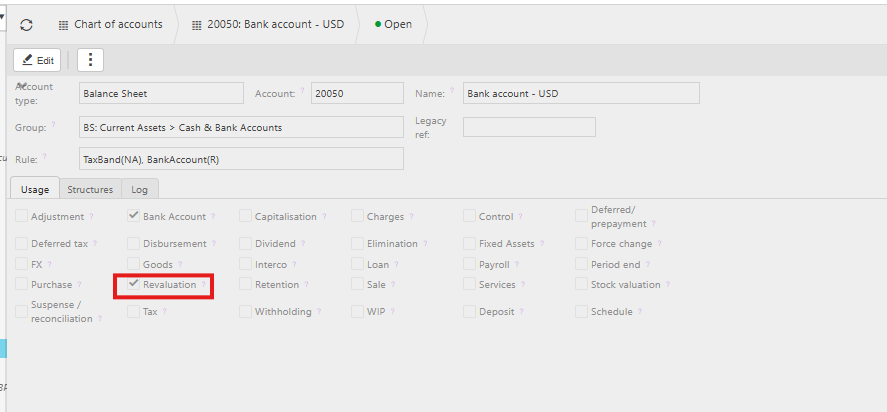
- First you would need to make sure that your bank accounts in iplicit are ticked for Revaluation.
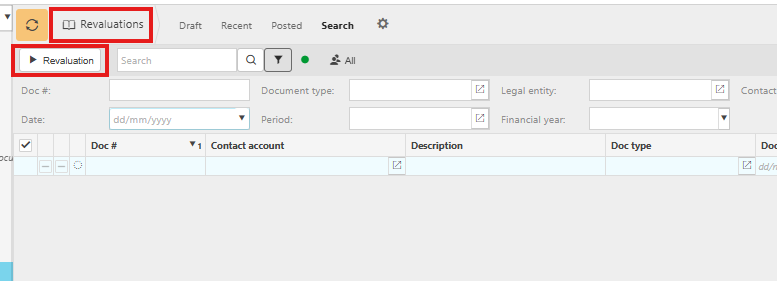
- Go to Revaluations and click on the Revaluation button
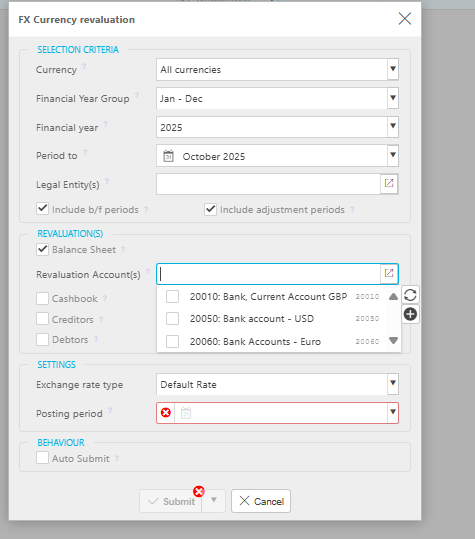
- Fill in the relevant information and under the revaluation(s) section click the option for Balance sheet and select the relevant bank account(s)
- This will generate manual journals that can be seen in the revaluations section for each of the bank accounts.
This link to the user guide may also be helpful : FX Revaluations | iplicit