

This article covers deleting the value in the 'Their ref' field on a sale invoice that's already posted. This can't be done while the invoice is posted. You need to unpost it first, edit it, then remove the value.
Why 'Amend' won't delete the 'Their ref' value
Selecting 'Amend' on a posted sale invoice only lets you replace the existing value in the 'Their ref' field with a different one. It doesn't let you delete the value entirely and leave the field empty. To do that, you need to unpost the document instead.
How to delete the 'Their ref' value from a sale invoice
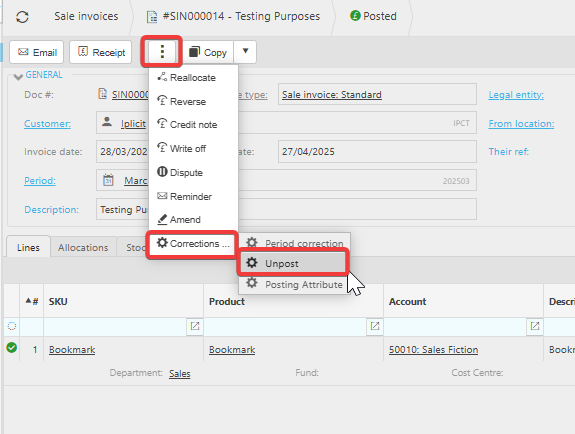
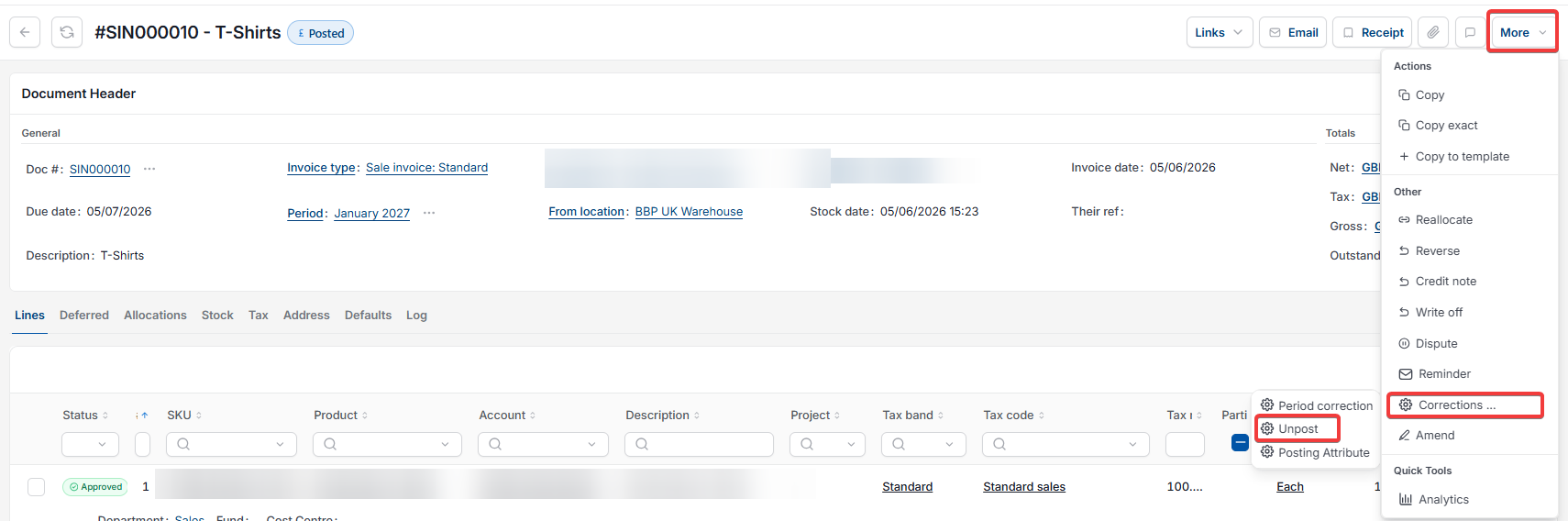
- Open the posted sale invoice. Depending on your screen, select the ellipsis (the three dots) or the 'More' menu, then select 'Corrections'
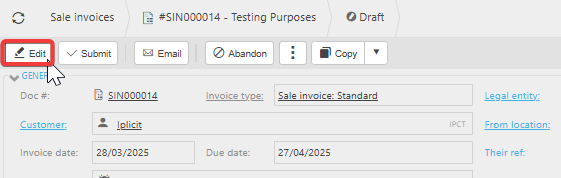
- Select 'Unpost'. The invoice now shows as 'Draft'
- Select 'Edit'
- Remove the value from the 'Their ref' field
- Save the changes.
Once saved, the 'Their ref' field is empty on the invoice.

How to change the ref in a sales invoice?
Delete Their ref sales invoice
Remove reference number posted invoice
Unpost sales invoice edit
Amend vs unpost sales invoice