

This article covers authorisation workflows in iplicit and whether to set one up at header level or line level (sometimes called detail level). Your choice decides what approval is based on. For example, an Expense claim can be approved on its total value or on the department or cost centre of each line.
Header level and line level on an authorisation workflow
When you fill in the 'Attributes' field on an authorisation workflow, you'll usually see two matching options. For an Expenses workflow, these are 'Expense' and 'Expense Detail'.
- 'Expense' applies the authorisation workflow to the whole claim – this is header level
- 'Expense Detail' applies the authorisation workflow to each line on the claim – this is line level, so approvals can be based on cost centre, department or other line details.
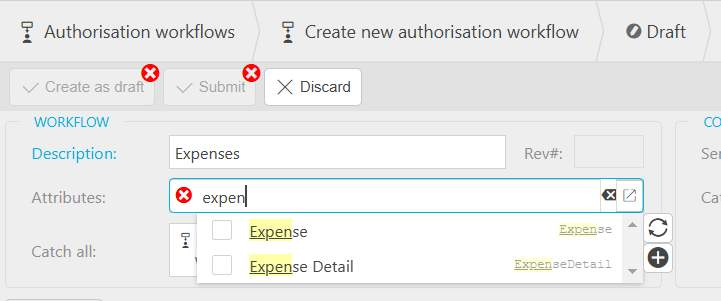
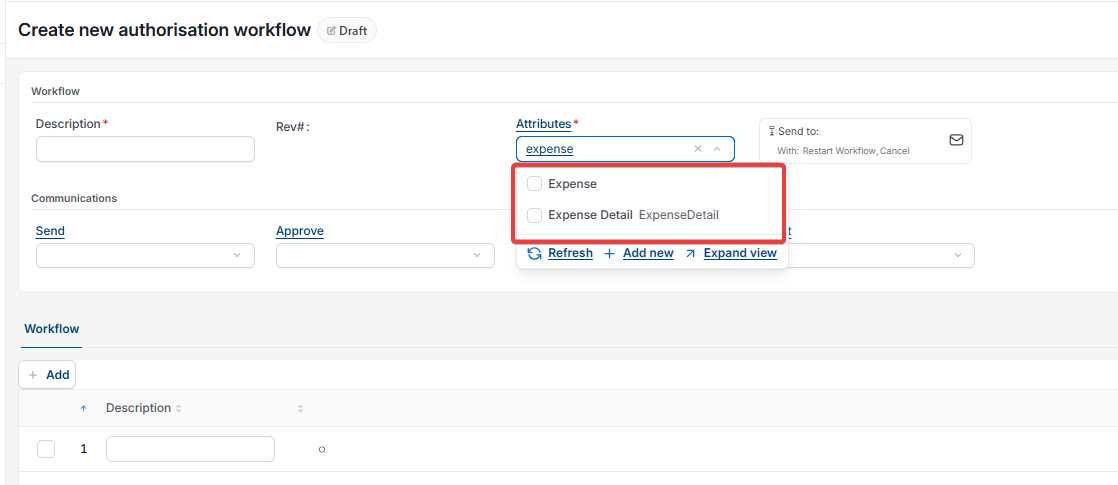
Choosing between header level and line level for authorisation workflows
Choose header level when one person should approve the whole claim, for example based on its total value. Choose line level when different people approve different lines, for example when each department manager approves their own department's costs.
Using header level and line level authorisation workflows together
If you need both, set up two separate authorisation workflows. Use 'Expense' on one for header-level approval and 'Expense Detail' on the other for line-level approval.
Header or line level workflow
Workflow attribute expense detail
Approval based on cost centre
Line level approval
Authorization workflow level
Two separate workflows expense