

This article covers correcting a VAT box figure on a VAT return in iplicit, where the original document that caused the error can no longer be amended. There is no way to type a new value straight into a VAT box on the VAT summary or VAT return, and no separate "VAT adjustment document" for that purpose. If you need to change a box value, use one of the two methods below.
Why you can't edit a VAT box directly on the VAT return
VAT box figures on the VAT return are calculated automatically, not entered by hand. Each figure is driven by the tax code (or tax group) applied to a document, and by the tax control account and VAT box mapping that document posts to. Because of this, there is no screen or button on the VAT return or VAT summary that lets you overwrite a box total directly.
Where possible, correct the source document instead – for example a purchase invoice or sales invoice with the wrong tax code. However, you cannot amend the original document if it meets any of the following:
- The document is linked to a VAT return that has already been closed
- The document is tied to a payment
- The document forms part of a finalised bank reconciliation
If any of these apply, use one of the two options below instead.
Option one: reverse the original document and create a new one
This is the preferred method where the source document is the problem, such as a purchase invoice posted with the wrong tax code.
- Open the original document – this example uses a purchase invoice, but the same method works for other document types
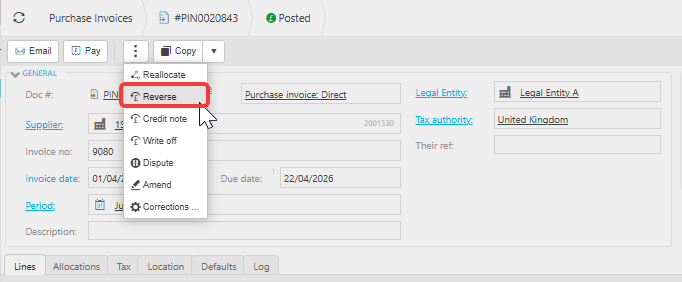
- Use the 'Reverse' function on that document
- Create a new document with the correct tax information, you can copy the original document to make is easier and make the changes
- Post the new document so it feeds into the correct VAT box on the current VAT return
Option two: post a tax-only manual journal
Use this method when reversing and recreating the document isn't practical, and you only need to move a figure between VAT boxes.
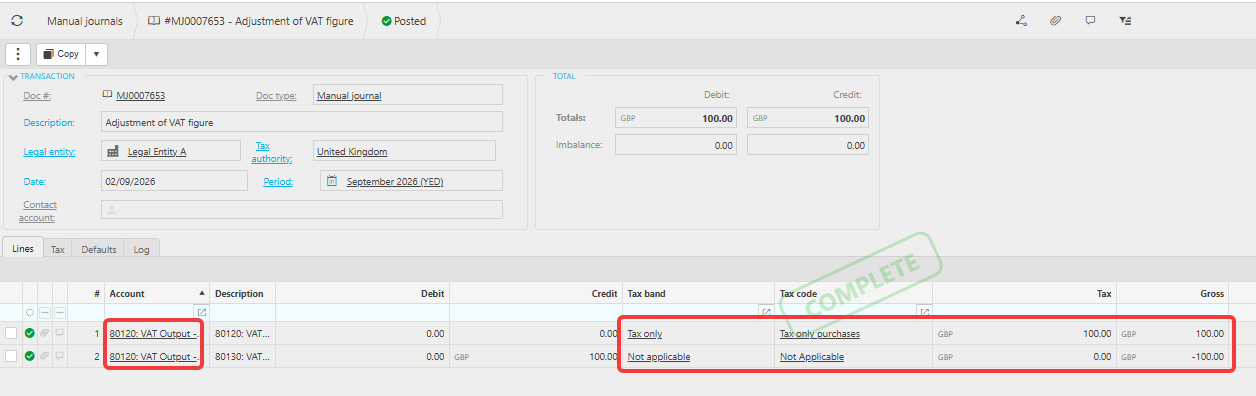
- Create a manual journal with two transaction lines
- Use the same VAT control code on both lines
- On the first line, select 'Tax only' and enter the adjustment figure in the tax box
- On the second line, enter the same total in the debit or credit column – debit to increase the VAT box balance, credit to decrease it
- Set the tax band and tax code on the second line to 'Not applicable', so it does not also post to the VAT return
Set the tax band and tax code on the second line to 'Not applicable' correctly – if this is left as a real tax code, the journal double-counts on the VAT return.
Adjust VAT box directly
Amend VAT return box
VAT box correction
Change VAT box figure
VAT adjustment document
Tax only journal VAT
Reverse VAT invoice
Edit VAT return box