

Cash Accounting for VAT is not supported in our system, and it's unlikely to be introduced in the future. To avoid confusion, any related options will be removed.
However, you can achieve similar functionality using a workaround: Deferred VAT on Proforma Invoices. This method allows VAT to be accounted for only when payment is received, effectively replicating the behaviour of Cash VAT.
Workaround: Using Deferred VAT on Proforma Invoices
Step 1: Enable Deferred Tax
In your document type settings, ensure the Deferred Tax option is enabled. This allows VAT to be deferred until payment is made.
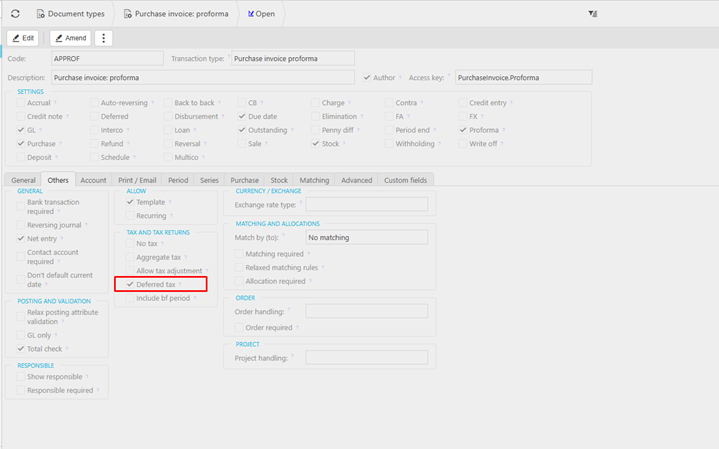
Step 2: Create a Deferred VAT Balance Sheet Code
If you haven’t already, create a Deferred VAT GL code. This should be a Balance Sheet account configured appropriately to hold deferred VAT amounts.

Step 3: Link Deferred VAT Code to Account Defaults
Go to Account Defaults and link the newly created Deferred VAT code. This ensures that when a Proforma Invoice is created with Deferred Tax enabled, the system uses this code instead of standard VAT codes.
Creating the Proforma Invoice
When you create a Proforma Invoice with Deferred Tax enabled:
- VAT is posted to the Deferred VAT account.
- No VAT is reported in the VAT return at this stage.
- The GL entries will debit Deferred VAT, ensuring VAT is held until payment is received.


When Payment Is Received
Once the Proforma Invoice is paid:
- The GL will credit Deferred VAT and debit VAT Input.
- VAT is now accounted for in the VAT return, aligning with the cash basis principle.

Feature Support Summary
| Feature | Status |
|---|---|
| Cash VAT Accounting | Not Supported |
| Deferred VAT on Proforma | Supported |
| VAT Due on Payment | Achieved via Deferred VAT |