

iplicit does not currently support any keyboard shortcuts, other than allowing for Ctrl+ when drilling through into different pages.
In addition, the search feature does allow for acronym values, such as DEC for Data Entry Control, FA for Fixed Assets etc. Which can be viewed on the menu structure screen in the keywords column.
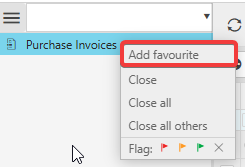
If you do have screens that you regularly use, these can be saved as favourite by right clicking on the item title on the left of the screen and selecting 'add favourite'.
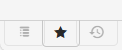
Anything added to favourites can then be found by clicking on the star icon in the bottom left corner of the screen. Additionally the icon to the right of the star will show a list of recently viewed pages.
As of December 2025