

This article covers an invoice not appearing on the AP automation landing page in iplicit. This can happen when the invoice's page count exceeds the 'Invoice page limit' set on the AP automation mailbox it was sent to.
Checking and changing the invoice page limit
- Search for 'AP automation mailboxes' and open the mailbox the invoice was sent to
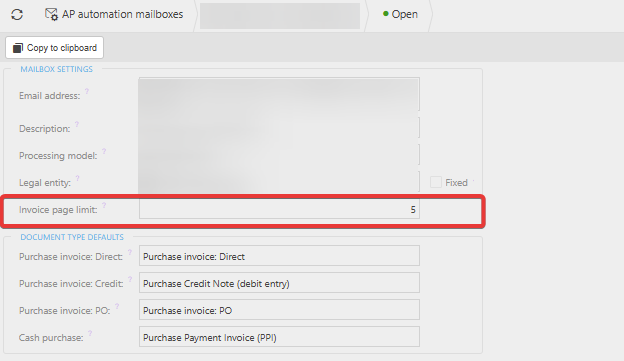
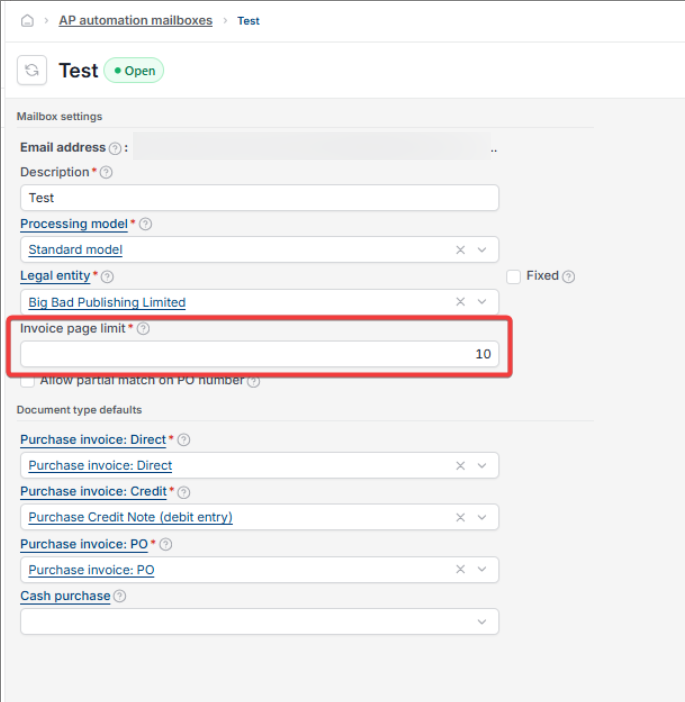
- Under 'Mailbox settings', check the 'Invoice page limit' field
- If the invoice you're expecting to see has more pages than this limit, increase the figure to a number that covers it.
Once increased, invoices within the new page limit pull through to the landing page successfully.
Screenshots for Legacy UI (before October 2026)
Screenshots for New UI (post October 2026)
Customer search terms
Invoices not showing AP automation
AP automation landing page missing invoice
Invoice page limit mailbox
AP automation mailbox settings
Long invoice not processing