

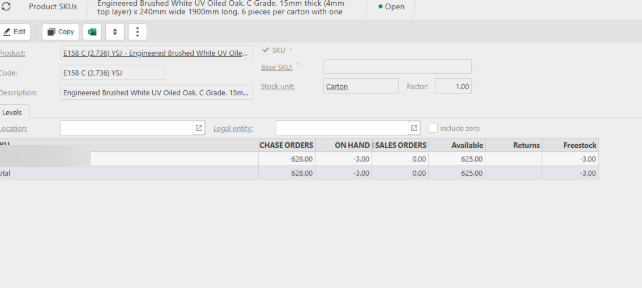
If a stock product is showing a negative quantity, iplicit will prevent you from amending any Purchase Order (PO) that includes that product.
This restriction exists because the system does not allow changes to POs when the associated stock level has fallen below zero.
How to Resolve the Issue
To amend the PO, you will first need to bring the stock level back to zero or into a positive quantity.
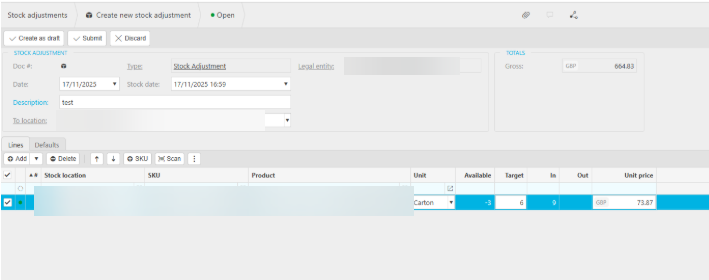
This is done by performing a Stock Adjustment.
Steps:
- Create a Stock Adjustment for the affected product.
- Increase the quantity to offset the negative balance.
- Post the adjustment.
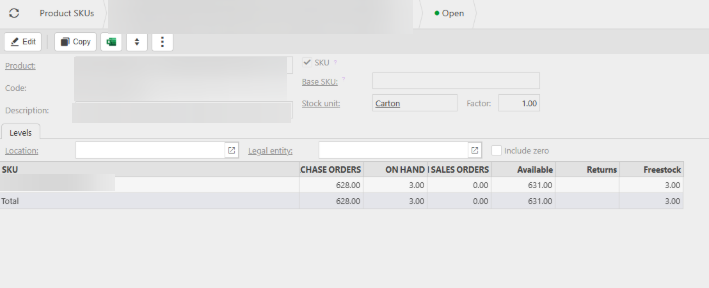
For example, if the product was at –3, entering a stock adjustment of +6 would bring the balance to +3.
Once the adjustment has been posted, the stock level will be corrected, and you will be able to amend the Purchase Order as required.
Stock adjustment
Amend purchase order with stock
Stock error
_______________________________________________________________________________________