

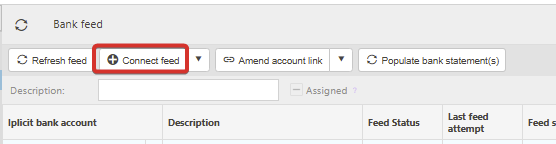
This article covers reconnecting an expired or disconnected bank feed in the Bank Feeds area of iplicit. If the 'Re-connect feed' button does not work, or if you receive an 'Internal Server Error: 500' when using it, the 'Connect feed' button will re-authorise the account in the same way.
When to use this method
Use this method in the Bank Feeds screen when any of the following happens:
- The 'Re-connect feed' button does not complete the re-authorisation
- You receive an 'Internal Server Error: 500' when trying to 'Re-connect feed'
- Transactions have stopped pulling through and the feed consent has expired
- You need to renew bank consent (sometimes called re-authorising or refreshing the connection)
How to reconnect a bank feed using the 'Connect feed' button
The steps below apply to the Bank Feeds screen in iplicit. For some banks, open banking tokens are handled differently which means 'Connect feed' completes the re-authorisation when 'Re-connect feed' does not.
- Open the Bank Feeds screen in iplicit
- Highlight the bank account you want to re-connect
- Select 'Connect feed'
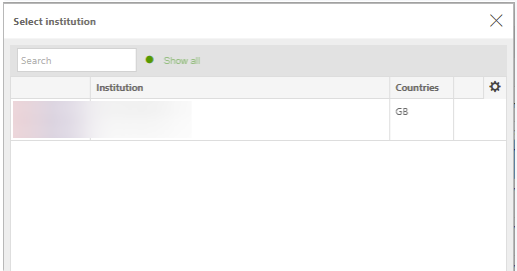
- In the pop-up, choose your banking institution and continue to the bank sign-in page
- Sign in to your bank
- Select the accounts you want to re-authorise and confirm
- Confirm the consent renewal in the pop-up that appears
- You are returned to iplicit automatically.
What to expect after reconnecting a bank feed
If the feed consent had already expired before you reconnected it, allow approximately three hours for the consent to update and for transactions to pull through into iplicit.
If the feed still has not updated after waiting, contact support.
If a new connection is created instead of refreshing the existing one
In some cases, reconnecting a bank feed creates a new separate connection in iplicit rather than refreshing the existing one. If this happens, contact support, as there may be follow-up action needed to keep your bank reconciliation working against a single feed.
Reconnect bank feeds
Issue with bank feeds
Bank feed has disconnected
Re-authorise bank feeds
Error 500 on bank feed
Expired bank feed issues