

This article covers the Interco enquiry in iplicit, which shows debtor and creditor balances between legal entities. You can also use it to check whether an intercompany posting is missing its linked journal on the other entity.
Reviewing intercompany balances with the Interco enquiry
- Search for 'Enquiries', then select 'Interco'
- Use the filters to narrow the results, for example by 'Legal entity', 'Financial year', 'Period' or 'Account'
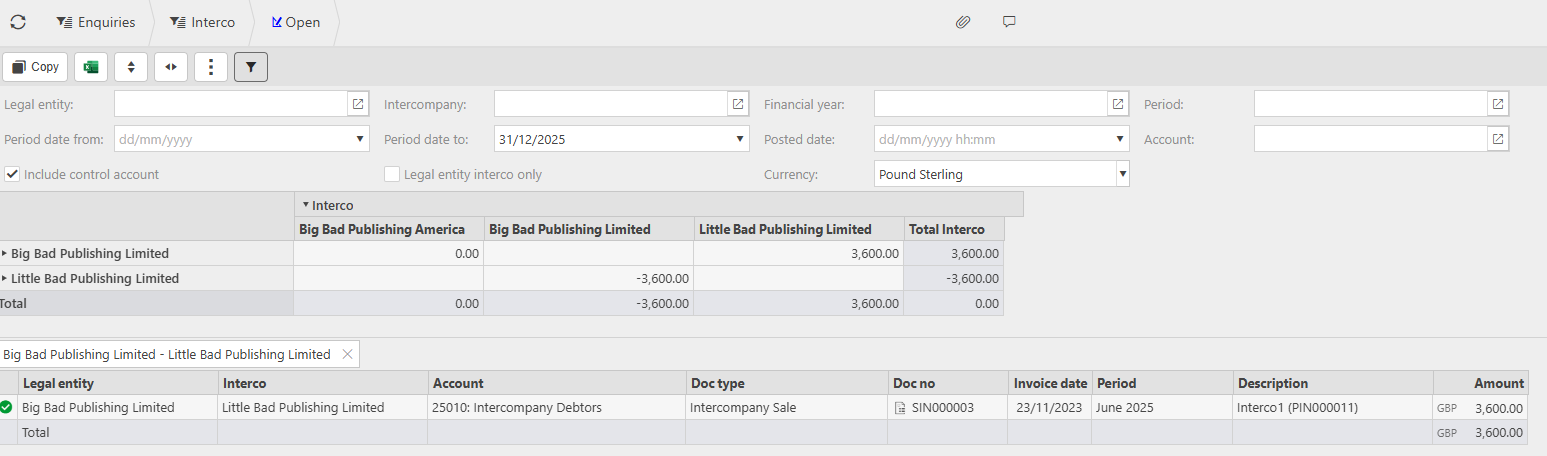
- Review the grid, which lists each legal entity down the left and shows its balance with every other legal entity across the columns.
Each cell shows the balance owed between that pair of entities. Selecting a cell opens the underlying transactions below the grid, showing the 'Account', 'Doc type', 'Doc no' and 'Amount' for each one.
Using the Interco enquiry to spot a missing linked journal
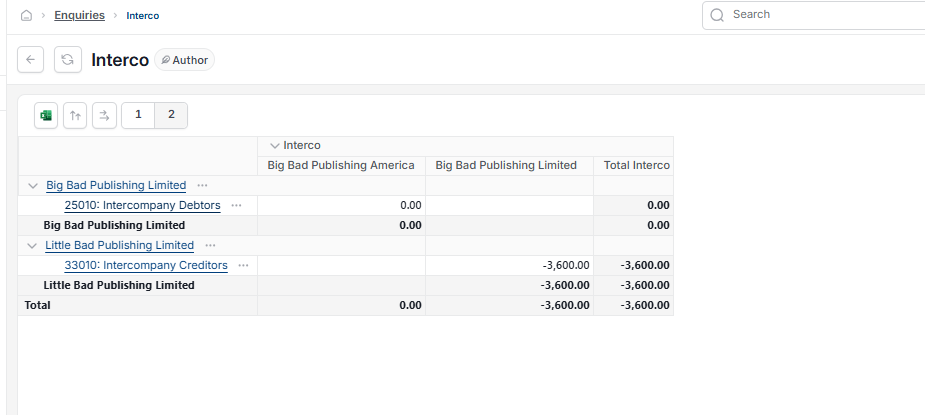
An intercompany posting always creates a balancing journal on the other legal entity. If one side is missing, the two entities won't net to zero against each other in the grid.
Check the 'Total' row and column – if a pair of entities doesn't balance to zero, this points to a linked journal that hasn't posted on the other entity.
Intercompany balances enquiry
Interco enquiry iplicit
Check intercompany balance between entities
Interco journal not posted
Review legal entity intercompany balances