

A bank account in iplicit must be configured correctly before it can be used on cash journals, whether posted through iplicit or via the API. Two settings on the bank account record control this – the 'Cash sale' option and the legal entity set against the accounting default. If either is missing, the bank account will not be available for cash journal entries.
Required bank account settings for cash journals
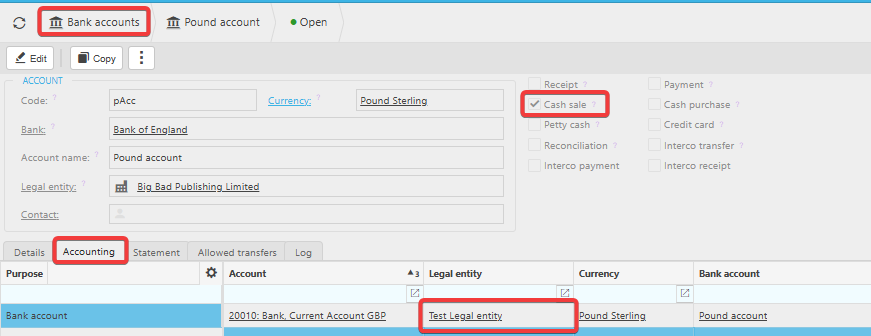
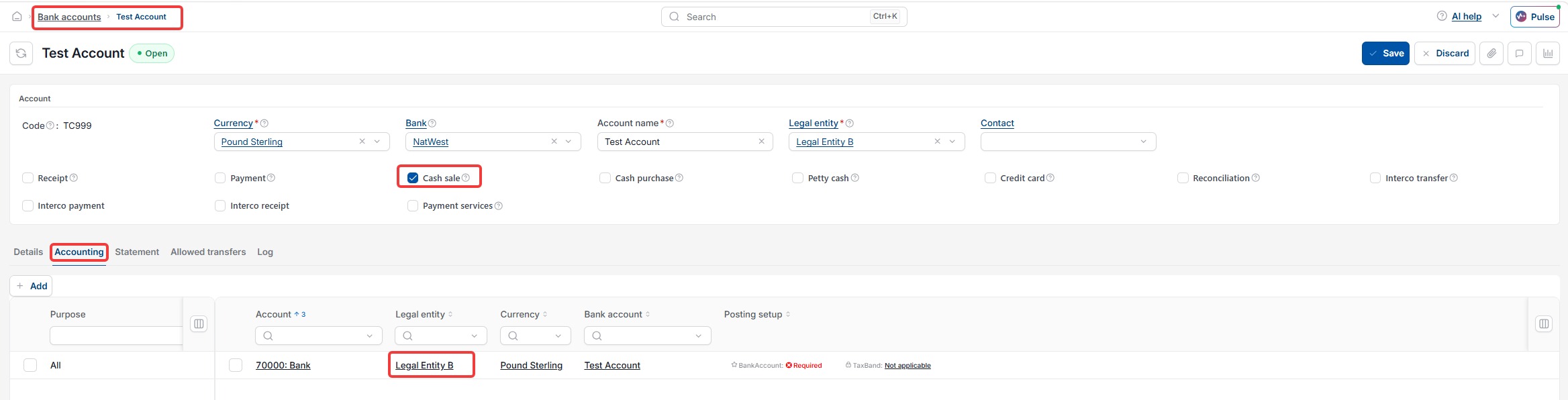
For a bank account to be usable on cash journals:
- 'Cash sale' must be enabled on the bank account
- A legal entity must be specified against the accounting default on the bank account
If either setting is missing, iplicit will prevent the bank account from being selected on a cash journal. Via the API, this typically surfaces as an 'Invalid bankAccount' error or a similar validation response.
How to check the bank account configuration
- Navigate to Bank Accounts and select the relevant account
- Confirm 'Cash sale' is ticked
- Open the 'Accounting defaults' section
- Confirm a legal entity is specified against the accounting default
- Save any changes
Once both settings are in place, the bank account will be available for cash journal entries, both in iplicit and via the API.
Troubleshooting API errors caused by bank account configuration
If an API cashbook post is failing with an error referencing the bank account – for example 'Invalid bankAccount' – and the bank account ID in the payload is correct, the bank account configuration is the most likely cause. Check both settings above before investigating other causes.
Cashbook for API entries
Settings for bank account for cash
Bank account configuration API