

This article covers how to view the released and remaining value of prepayments in the Purchase Ledger. There are two ways to do this in iplicit - across all prepayment invoices at once using the Prepayment invoices enquiry, or on an individual invoice using the Prepayment tab.
Viewing released values across all prepayment invoices
Navigate to Enquiries and search for Prepayments, select 'Prepayment invoices' from the enquiries available. This gives a summary view of all purchase invoices that have a prepayment distribution profile applied.
The enquiry shows each invoice with the following key columns:
- Net - the total value of the invoice
- Recognised - the amount that has been released to the P&L account to date
The difference between Net and Recognised is the amount still held in the prepayment balance sheet holding account. Use the filters at the top of the enquiry to narrow results by legal entity, period, account, document type, or contact account.

Viewing released values on an individual invoice
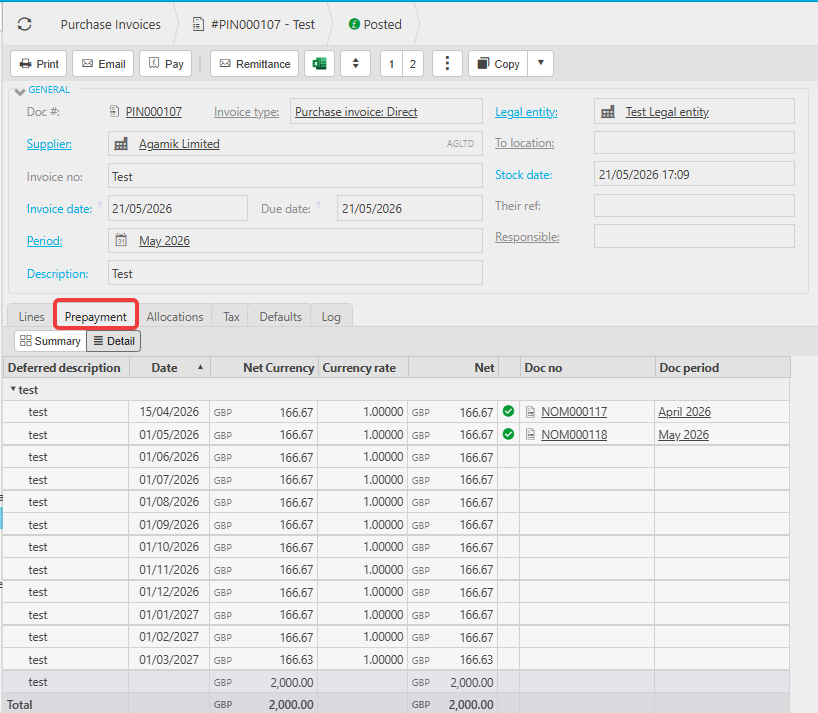
Open the posted purchase invoice in the Purchase Ledger and select the 'Prepayment' tab. This shows the full distribution schedule for that invoice, with each period, the amount due, and whether the release has been fulfilled.
Select 'Detail' to see the exact amounts posted per period.
See: How do I view my prepayment journals and schedule after posting a purchase invoice for full details on navigating the Prepayment tab.
Released value prepayments
See released prepayment amount
Prepayment released balance
How much prepayment released
Prepayment remaining balance
Prepayment outstanding value
Prepayment invoices enquiry
Prepayment recognised value