

This article covers deleting a budget forecast or a budget in the legacy Budgets module in iplicit. It does not apply to the new Budgeting module, which is a separate module. Deletion is permanent and cannot be undone. To keep the record but stop further edits, lock it instead – see 'How to lock a budget forecast in iplicit'.
Before you delete a forecast or budget in the legacy Budgets module
There is no way to recover a deleted forecast or budget. If you may need the record later – for example, for audit purposes or a year-end review – lock it rather than delete it.
Deleting a budget forecast in the legacy Budgets module
A forecast can be deleted at any stage, regardless of its status ('Open', 'Approved' or 'Closed').
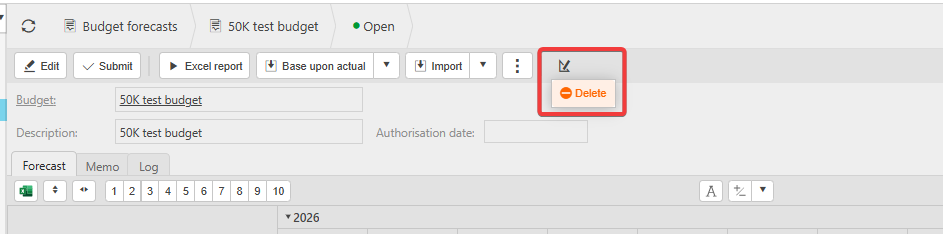
- Navigate to 'Budget forecasts' and open the forecast you want to delete
- Depending on your screen, either select the delete icon in the top toolbar, or select the 'More' drop-down and choose 'Delete'
- Confirm the deletion when prompted.
The forecast is permanently removed from iplicit.

Deleting a budget in the legacy Budgets module
Deleting a budget permanently removes the budget and every forecast linked to it, not just one forecast. If you only want to remove one forecast, delete that forecast individually instead.
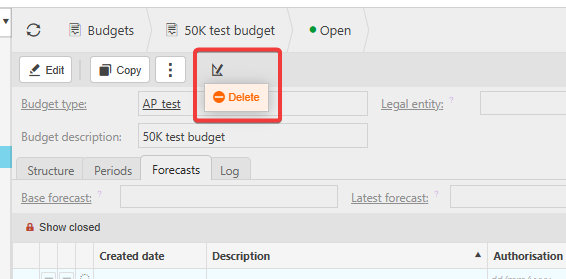
- Navigate to 'Budgets' and open the budget you want to delete
- Depending on your screen, either select the delete icon in the top toolbar, or select the 'More' drop-down and choose 'Delete'
- Confirm the deletion when prompted.
The budget and all its forecasts are permanently removed.

Delete budget
Delete forecast
Remove forecast
Delete approved forecast
Delete budget forecast
Remove a budget