

This article covers how to set up a detail-driven authorisation workflow that routes a purchase invoice based on whether a prepayment line is present. A deferred profile on a purchase invoice line indicates a prepayment arrangement. Use this approach when invoices containing prepayment lines require a different approval path to standard invoices.
For sales invoice routing based on deferred income, see How to route a sales invoice for approval including deferred income.
Why use a detail-driven workflow for this?
Purchase invoice authorisation workflows can run at header level or detail (line item) level. To check whether a prepayment exists on an individual line, the workflow must be detail-driven – a header-level workflow cannot inspect line item attributes. This is the correct approach for prepayment routing on purchase invoices.
Setting up the workflow
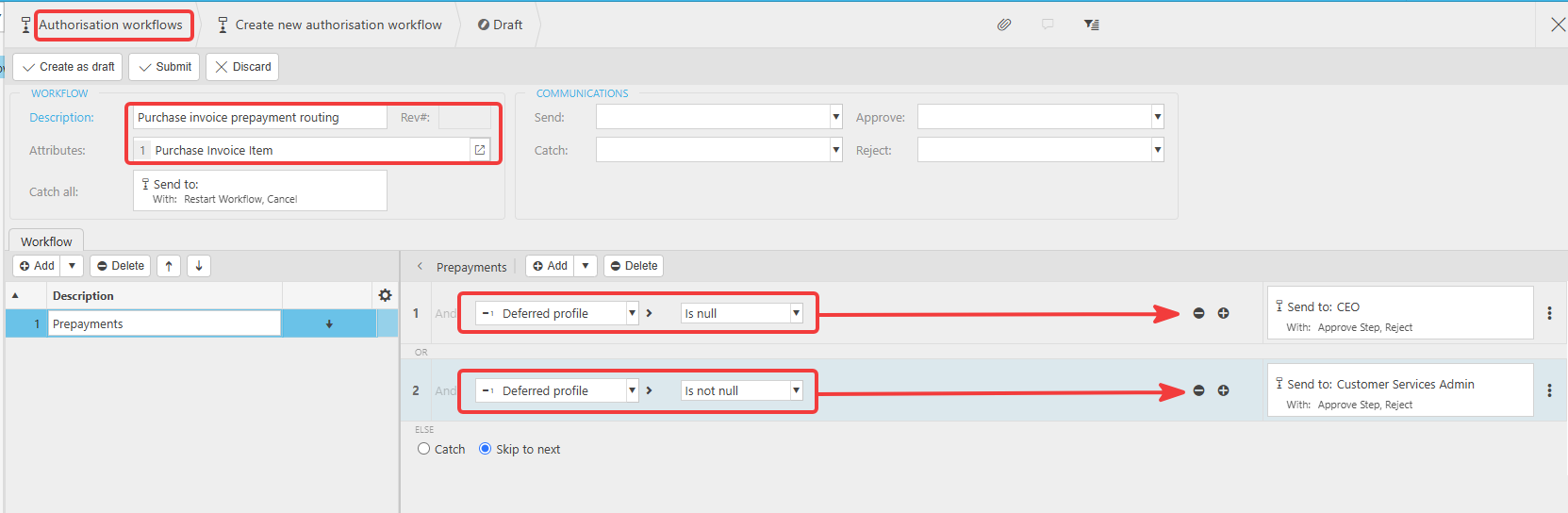
- Go to Authorisation Workflows and select 'Create new authorisation workflow'
- Enter a description for the workflow – for example, "Purchase invoice prepayment routing"
- In the 'Attributes' field, select 'Purchase Invoice Item' – this sets the workflow to run at detail (line item) level
- In your first workflow step, add a condition and set the attribute to 'Deferred profile'
- Set the operator to 'Is null' – this targets lines where no prepayment has been assigned
- Set the action to send the invoice to your chosen approver for standard purchase invoices
- Add a second workflow step for the opposite condition – set 'Deferred profile' to 'Is not null' – this targets lines where a prepayment is present
- Set the action on this step to send the invoice to your chosen approver for prepayment review
- Select 'Create as draft' to save, review the workflow, then select 'Submit' to activate it
How the two conditions work
Every purchase invoice line passes through the workflow. The two steps cover every possible state of a line:
- 'Deferred profile' is null – the line has no prepayment attached. The invoice routes to the standard approver
- 'Deferred profile' is not null – the line has a prepayment attached. The invoice routes to the approver responsible for reviewing prepayment lines.
If any line on the invoice matches the 'is not null' condition, that step triggers for that line.
Prepayment approval route
Purchase invoice authorisation
Detail driven workflow
Route invoice prepayment
Purchase invoice item workflow
Prepayment line approval
Deferred profile purchase