

This article covers why transactions that are visible in the Bank Feeds screen in iplicit are not appearing in your bank statement or Bank Reconciliation. In iplicit, bank feed transactions do not flow directly into Bank Reconciliation - they must first be added (or "populated") into a bank statement. Until that step is completed, the transactions will not appear when you open Bank Reconciliation unless they are manually created.
If your bank feed has stopped pulling in transactions entirely, see Why has my bank feed stopped pulling through transactions?
Understanding the difference between bank feed and bank statement in iplicit
The Bank Feeds screen in iplicit shows transactions received directly from your bank via Open Banking. Think of this as a live inbox of your bank activity. However, iplicit uses a separate bank statement record to hold the transactions that are available for matching in Bank Reconciliation.
Transactions move from the bank feed into the bank statement through a process called 'Populate Bank Statements'. Until this process runs, you will see the transactions on the bank feed but find nothing to match against in Bank Reconciliation.
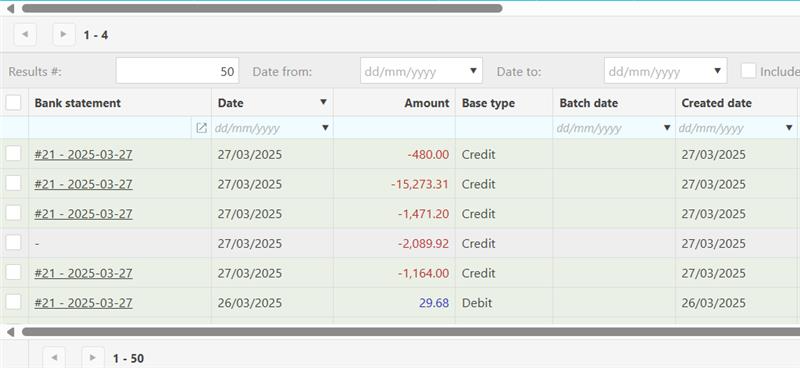
You can tell which transactions have already been added to a bank statement by the colour of the lines in the Bank Feeds screen:
- Green lines - the transaction has been populated into the bank statement and is available in Bank Reconciliation
- Grey lines - the transaction has not yet been populated into the bank statement
How to get bank feed transactions into Bank Reconciliation in iplicit
The 'Populate Bank Statements' process can run in two ways:
Option 1: Automatically via the scheduler
If your iplicit scheduler is configured to run 'Populate Bank Statements', this happens without manual intervention. Check with your system administrator whether the scheduler is active for your organisation.
Option 2: Manually
If the scheduler is not set up, you can populate the bank statement manually. Follow the steps in the Bank Feeds user guide - the relevant section is 'How to populate bank statement manually'.
Once the process has run, return to Bank > Bank Reconciliation. The transactions will now appear in your bank statement, ready to match against cashbook entries.
Populate bank statements
Bank transactions not appearing on reconciliation
Bank statement missing transactions
Transactions not showing
Feeds not going to statement