

This article covers how to find an abandoned document in iplicit using any document finder screen. The same method applies to any document type, including nominal journals, sales invoices, purchase invoices, sales orders, purchase orders and cash documents. When a document is abandoned, it is not removed from iplicit – it is retained with a status of 'Abandoned' so it remains fully auditable.
By default, abandoned and locked documents are hidden from the document finder. You need to expose them before the status filter will return any results.
Exposing locked and abandoned documents in the document finder
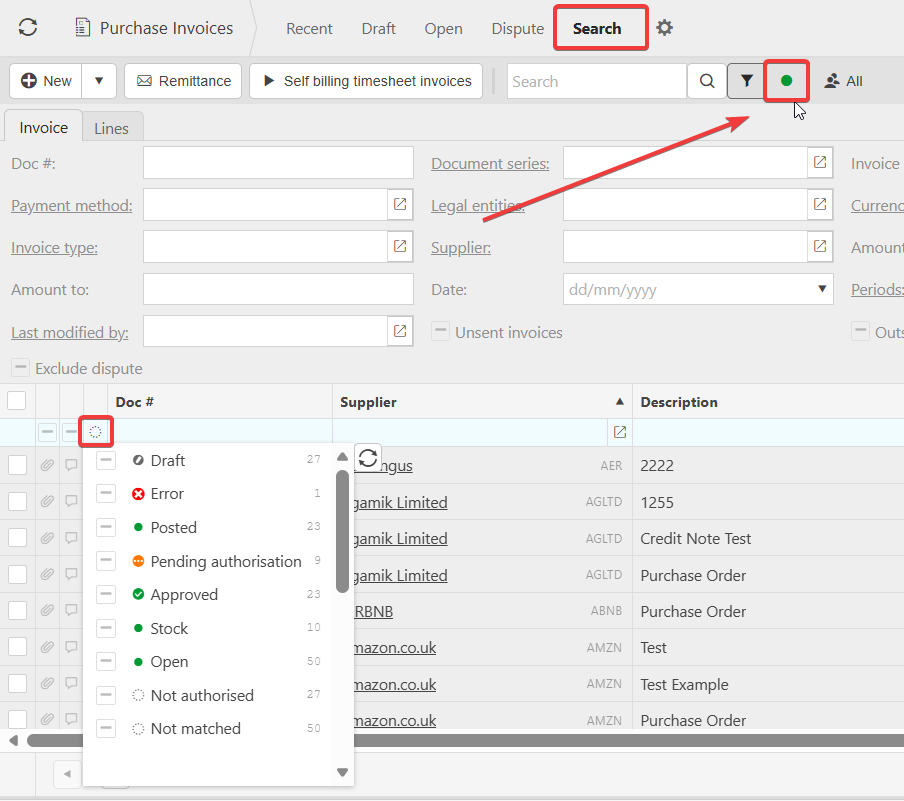
Abandoned documents will not appear in any document finder until you expose locked and abandoned documents. This is controlled by the green dot near the search box at the top of the screen.
- Open any document finder screen for the document type you are looking for (for example, the nominal journal finder, the sales invoice finder, or the purchase invoice finder)
- Locate the green dot near the search box at the top of the screen
- Select the green dot to expose locked and abandoned documents in the view.
The finder will now include abandoned documents in its results, alongside posted and draft ones.
Filtering by abandoned status in the document finder
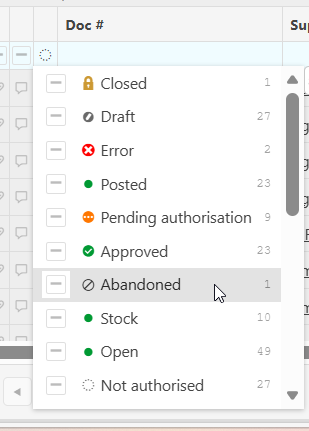
Once locked and abandoned documents are exposed, you can use the status filter inside the search tab to show abandoned documents only.
- Open the search tab in the document finder
- Select the 'Status' filter
- Choose 'Abandoned' from the available statuses
- Apply the filter.
The document finder will now display every abandoned document of that type within the current view. Select any line to drill into the original document.
Why an abandoned document might still not appear
If an abandoned document does not appear after applying the status filter, the most common causes are:
- Locked and abandoned documents have not been exposed using the green dot near the search box
- The date range or other search criteria exclude the period the document was originally created in
- You are searching from the wrong document finder for the document type (for example, looking in the sales invoice finder for an abandoned nominal journal)
- Your user permissions do not include access to the legal entity the document was raised against
- The Data Access Control settings restrict your visibility of the relevant ledger or dimension.
Adjust the filters, switch to the correct document finder, or check your access with an iplicit administrator if the document is still not visible.
Find abandoned document
Locate document by status
Expose abandoned document
Search for document