

This article covers what to do when you have cancelled an iplicitPay payment at your bank but it is still showing as processing in iplicit. It also explains why you should not disconnect your iplicitPay connection while bulk payments are open.
Do not disconnect iplicitPay while you have open bulk payments
Do not disconnect your iplicitPay connection while you have open bulk payments, particularly any that have already been sent to the bank. Disconnecting iplicitPay while payments are in flight prevents iplicit from receiving status updates from the bank, which is the most common cause of a stuck iplicitPay payment.
Resolving a stuck iplicitPay payment
If you have cancelled the payment at your bank but it is still processing in iplicit, wait 24 working hours for the cancelled status to come through from the bank. If the payment is still stuck after that, follow these steps to manually unallocate and reverse it:
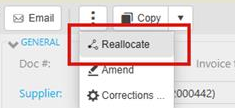
- Open the original invoice that the iplicitPay payment was allocated against
- Select 'Reallocate'
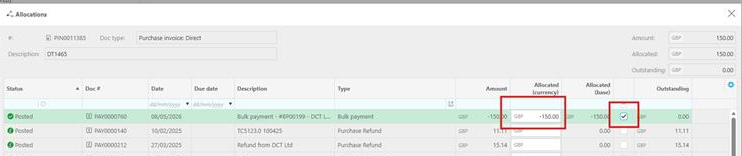
- Remove the allocated value, or uncheck the checkbox, and save
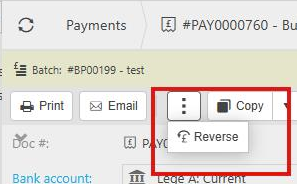
- Open the payment document, which should now be unallocated
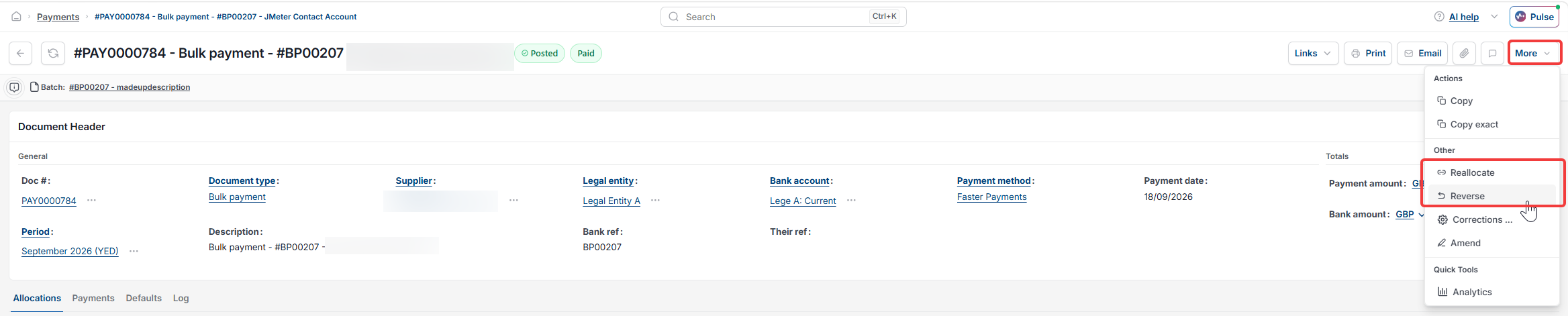
- Reverse the payment
The invoice will return to an outstanding state and is available to reallocate or pay through your usual method.
If you cannot complete these steps
If you are unable to unallocate or reverse the iplicitPay payment by following the steps above, contact the iplicit support team.
Cancelled payment for iplicitPay
Payment is stuck for iplicitPay
Cancelling a iplicitPay payment
iplicitPay got stuck
Disconnecting iplicitPay