

This article covers how to lock an API key in iplicit's User Accounts area. Locking a key is the same as deleting, removing, revoking or invalidating it. Only admin users can perform this action.
Once locked, the key is permanently invalidated. Any integration or connection using that key will stop working immediately. This action cannot be undone.
How to lock (delete, remove or invalidate) an API key in iplicit
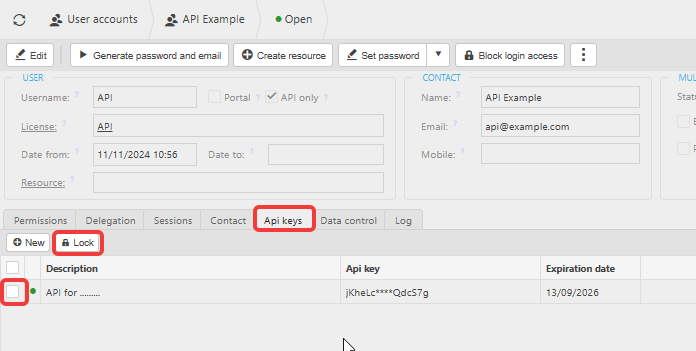
- Navigate to the user account that owns the API key
- Select the 'Api keys' tab
- Tick the checkbox to the left of the key you want to lock (delete)
- Select 'Lock' then 'Apply'
- Select the refresh icon in the top-left of the user account to update the view.
The key is now permanently invalidated and removed from view. Any integration relying on that key will no longer authenticate.
What happens when you lock an API key
When you lock an API key in iplicit, the key is immediately invalidated. This means:
- Any application, integration or third-party connection using that key loses access straight away
- The key disappears from view after you refresh the user account
- The action is permanent - a locked key cannot be reactivated or restored
If you need API access to continue, a new key must be generated. See How to create an API key in iplicit.
Invalidate API key
Remove API key
Delete API key
Lock the API key