

This article covers how to create an API key in iplicit. API keys are used to authenticate integrations and third-party connections with iplicit. Only admin users can create API keys.
Creating an API key in iplicit is a two-part process - you first create a dedicated API user account, then generate the key from within that account.
Part one: create an API user account
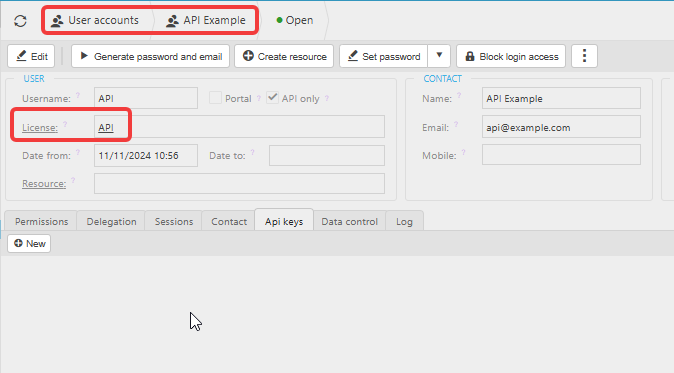
API keys in iplicit belong to a user account set up with the API licence. You need to create this account before you can generate a key.
- Navigate to 'User accounts'
- Select 'New' to create a new user account
- Enter a username - use something that clearly identifies this as an API account (for example, "API -- Integration Name")
- Set the 'License' field to 'API' - iplicit will automatically tick the 'API only' checkbox when you do this
- Select 'Create' to save the account
Part two: generate an API key
Once the API user account has been saved, you can generate a key from within it.
- Open the API user account you just created
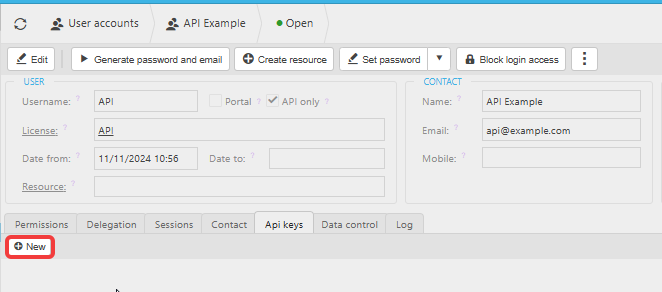
- Select the 'Api keys' tab
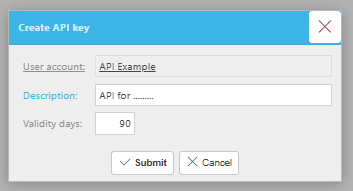
- Select 'New' - the 'Create API key' window opens
- Enter a description for the key in the 'Description' field - use something that identifies what the key is used for
- Set the number of validity days in the 'Validity days' field - the default is 90 days. Best practice is to rotate API keys every 90 days
- Select 'Submit'
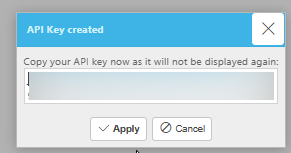
The 'API Key created' window opens and displays your key. Copy the key immediately and store it
 somewhere safe - it will not be displayed again once you close this window.
- Select 'Apply' to close the window
Part three: add the API user to Data Access Control
After creating the API user account and key, you must add the API user to the appropriate Data Access Control group in iplicit. This controls which data the API connection can access.
Without this step, the API user will not be able to access the data it needs.
How to rotate an API key in iplicit
Rotating a key means replacing an existing key with a new one. You should rotate API keys every 90 days as best practice, or immediately if a key has been compromised.
To rotate (replace, renew or regenerate) an API key in iplicit:
- Lock (delete) the existing key - see How to lock (delete) an API key in iplicit
- Follow Part two of this article to generate a new key from within the same API user account
- Update any integrations or connections with the new key.
How to connect API?
Create API key
API set up
Rotate an API
Remove old API and replace