

This article covers banks available within the iplicit Bank Feeds module through our third-party provider Yapily. It explains how to connect an account, how to request access to our alternative provider Plaid for wider European, US and Canadian coverage, and what to do if your account type cannot be connected.
Connecting a bank account through Bank Feeds
The iplicit Bank Feeds module lists a wide range of UK and international banks. Even when your bank appears in the list, individual account types – business, personal, commercial, or card products – may not be supported by the bank's own open banking permissions.
Always attempt the connection through the 'Connect' function in Bank Feeds first. The connection process confirms in real time whether your specific account type is available, which is more reliable than checking the bank name alone.
If the connection fails, the restriction sits with the bank rather than with iplicit. Move to the manual bank statement process described below.
Banks not covered by Yapily
If your bank is not in the Yapily list below, iplicit also offers an alternative provider called Plaid. Plaid extends Bank Feeds coverage to further European banks and banks in the United States. Canadian coverage through Plaid is currently limited to two banks – contact support to confirm whether your bank is included.
Contact the iplicit support team to discuss enabling Plaid for your environment. Support will confirm whether your bank is covered and guide you through the setup.
When you cannot connect through Bank Feeds
If your account type is not supported by the bank's feed, you can upload manual bank statements instead. iplicit may already have an interface built for your bank's statement format, so the first step is to attempt a statement upload.
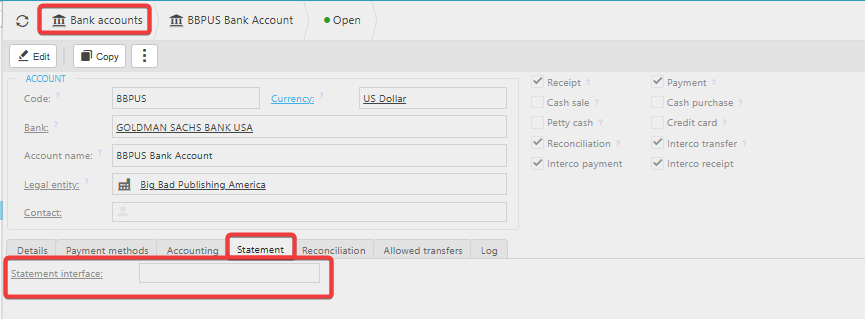
Before importing, ensure the relevant interface has been added to the bank account settings under the 'Statements' tab. Without an interface assigned, the import will not run.
If no interface is available, or the upload is unsuccessful, contact the iplicit support team and attach a copy of your bank statement in CSV format. Support will arrange for the required interface to be built, test it against your statement, and confirm once it is ready to use.

Banks available in the Bank Feeds module
The following banks are available to connect through Bank Feeds. Account-level availability depends on each bank's own restrictions:
- Allica Bank
- Allied Irish Bank (First Trust Business and Personal, Standard Business and Personal)
- American Express UK
- Bank of Ireland UK plc
- Bank of Scotland (Business and Personal)
- Bank of Scotland UK and EU Commercial
- Barclaycard
- Barclaycard Commercial
- Barclays (Business, Wealth and Personal)
- C. Hoare and Co
- Capital One
- Cater Allen
- Chelsea Building Society
- Cooperative Bank (Business)
- Coutts and Company
- Coutts ClearSpend
- Cumberland Building Society
- Danske Bank (and Business)
- Engage Bank
- Ffrees Bank
- First Direct
- Halifax
- Handelsbanken (Business and UK)
- HSBC (Business, Corporate, Kinetic and Personal)
- ING
- Lloyds (Business, Commercial and Personal)
- M&S Bank
- MBNA
- Metro Bank plc
- Mettle
- Monzo
- Monzo Proprietary
- Nationwide
- NatWest
- NatWest Bankline
- NatWest ClearSpend
- Paypal
- Payoneer – UK
- Revolut
- Royal Bank of Scotland
- Royal Bank of Scotland Bankline
- Royal Bank of Scotland ClearSpend
- Sainsbury's Bank
- Santander (Business, Corporate and Personal UK)
- Silicon Valley Bank
- Soldo UK
- Starling Bank
- Starling Personal Access
- Tesco Bank
- ThinkMoney
- Tide
- Trilogy Dragon Bank
- TSB Bank plc
- Ulster Bank (UK)
- Ulster Bank Bankline (NI)
- Ulster Bank NI ClearSpend
- Unity Trust
- Vanquis
- Virgin Money and VM Essential
- Wise
- Yorkshire Building Society
- Zempler Bank.
Bank feeds compatible banks
Connect a bank account
What banks can I use the bank feeds for?
List of available bank accounts in bank feeds