

This article covers why prepayment releases are only occurring on direct purchase invoices and not on invoices matched to a purchase order in the Purchase Ledger. This happens when the purchase order invoice document type is not included in the prepayment automation setup.
Why releases are missing on purchase order invoices
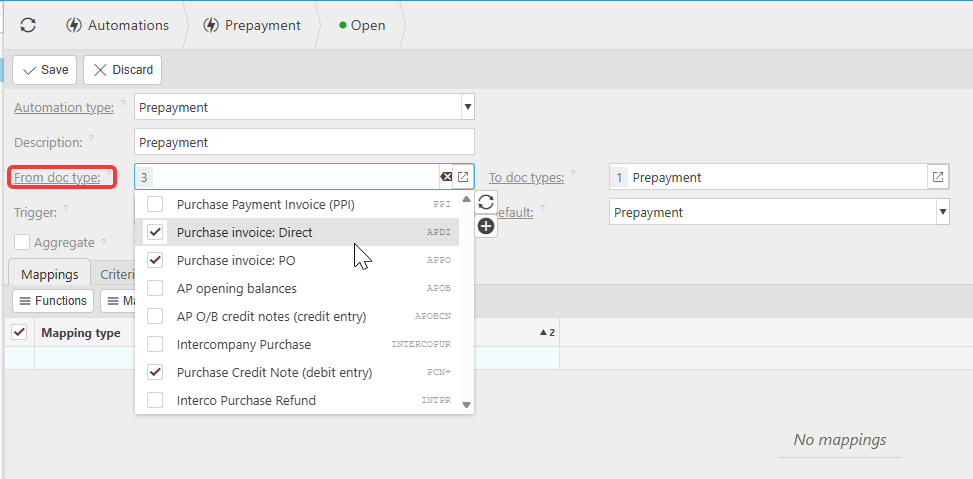
The prepayment automation in iplicit triggers against specific document types listed in the 'From doc type' field. If the automation was originally set up with only the direct purchase invoice document type selected, it will not trigger for invoices raised against a purchase order as these use a different document type.
How to fix this in the Purchase Ledger
Navigate toAutomations and open the prepayment automation.
Check the 'From doc type' field. If the purchase order invoice document type is not listed, add it. Save the automation.
Future invoices matched to a purchase order will now trigger the prepayment release correctly.
If existing purchase order invoices have already been posted without triggering the automation, you may need to run the automation manually for those documents or contact support to review the impacted transactions.
Prepayment not releasing PO invoice
Prepayment only works direct invoice
Prepayment purchase order not working
Prepayment releases missing PO
Prepayment automation purchase order
PO invoice prepayment not triggering
Prepayment matched invoice not releasing