

iplicit does not include a dedicated contra function between the Sales Ledger (SL) and Purchase Ledger (PL). When a contact is both a customer and a supplier, you can still net their balances by raising a credit on each ledger to a shared suspense account. This article covers how to set up the contra account and perform the contra in the Sales Ledger and Purchase Ledger.
Before you start – Chart of Accounts setup for the Sales Ledger and Purchase Ledger contra
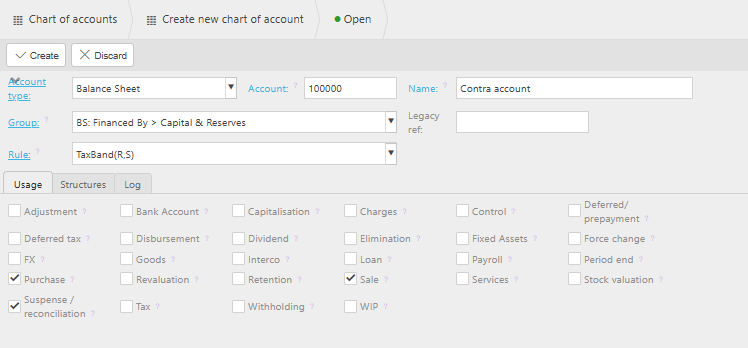
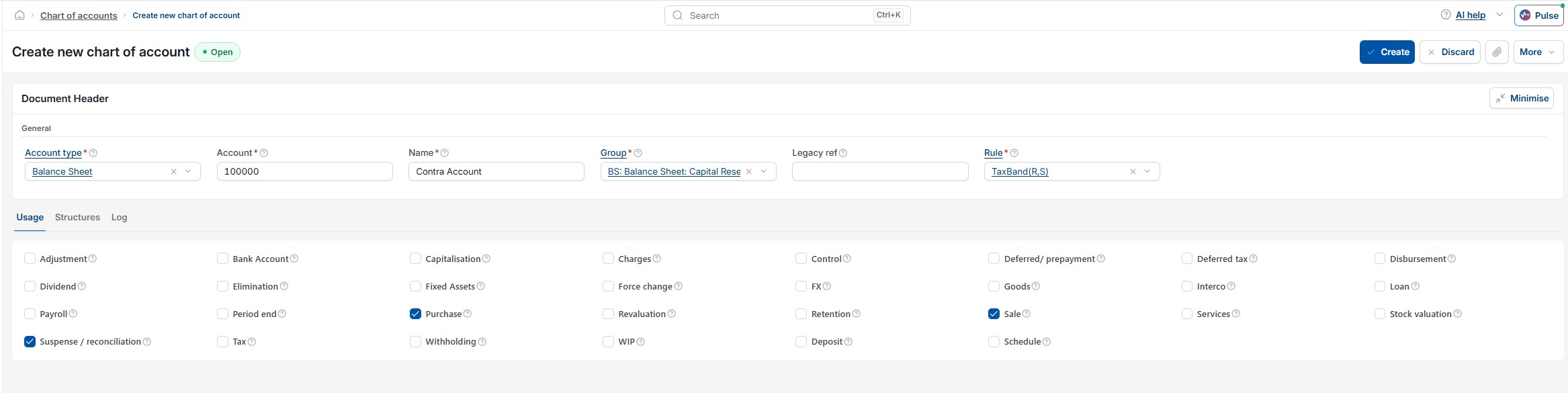
For the contra to work, the contra account used must be configured correctly on the Chart of Accounts. When setting up (or amending) the contra account, make sure both of the following are enabled:
- 'Sales' – so the account is available when raising credits in the Sales Ledger
- 'Purchase' – so the account is available when raising credits in the Purchase Ledger.
Without both settings enabled, the contra account will not appear as a posting option on one or both ledgers, and the contra cannot be completed.
How to contra between the Sales Ledger and Purchase Ledger
- Raise a credit on the Sales Ledger against the customer, posting to the contra account
- Raise a credit on the Purchase Ledger against the supplier, posting to the same contra account
- Allocate each credit against the open invoice on its respective ledger
- Confirm the contra account balance nets to zero once both credits are posted.
Once complete, the customer balance and supplier balance are reduced by the contra amount, and the contra account returns to nil.
Contra between sale and purchase
Offset customer balance
Same entity customer and supplier
SL/PL contra