

This article covers reconnecting a Bank Feed in iplicit when the standard 'Re-connect feed' button doesn't work – for the standard reconnect process itself, see 'Why has my bank feed stopped pulling through transactions'.
When to use this method
Use the steps below in the Bank Feeds screen when any of the following happens:
- 'Re-connect feed' does not complete the re-authorisation
- You see an 'Internal Server Error: 500' when using 'Re-connect feed'
- Transactions have stopped pulling through and you've confirmed the feed consent has expired
- You need to renew bank consent, sometimes called re-authorising or refreshing the connection.
How to reconnect a bank feed using 'Connect feed'
For some banks, Open Banking tokens are handled differently, which means 'Connect feed' completes the re-authorisation even when 'Re-connect feed' doesn't.
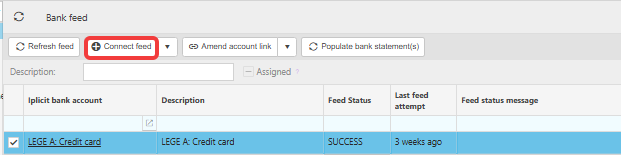
- Open the Bank Feeds screen
- Highlight the bank account you want to re-connect
- Select 'Connect feed'
- In the pop-up, choose your banking institution and continue to the bank sign-in page
- Sign in to your bank
- Select the accounts you want to re-authorise and confirm
- Confirm the consent renewal in the pop-up that appears
- You are returned to iplicit automatically.

What to expect after reconnecting a bank feed
If the feed consent had already expired before you reconnected, allow three to six hours, depending on the bank, for the consent to update and for transactions to pull through into iplicit. If the feed still hasn't updated after waiting, contact support.
If a new connection is created instead of refreshing the existing one
In some cases, reconnecting creates a new, separate connection in iplicit rather than refreshing the existing one. If this happens, contact support – there may be follow-up action needed to keep your bank reconciliation working against a single feed.
Reconnect bank feeds
Issue with bank feeds
Bank feed has disconnected
Re-authorise bank feeds
Error 500 on bank feed
Expired bank feed issues