

This article covers how to undo a posted FX Realised document within the Period End module. This is typically needed when a payment has been refunded or unallocated after the FX Realised document was already posted to clear the currency difference. You cannot directly unallocate (delete) an FX Realised document - instead, you either unpost and abandon it, or reverse it, depending on whether the period is open or closed.
Which route do I need?
Check the period status of the FX Realised document before you begin.
- If the document is in an open period - follow the Unpost and abandon route below
- If the document is in a closed/locked period - follow the Reverse route below.
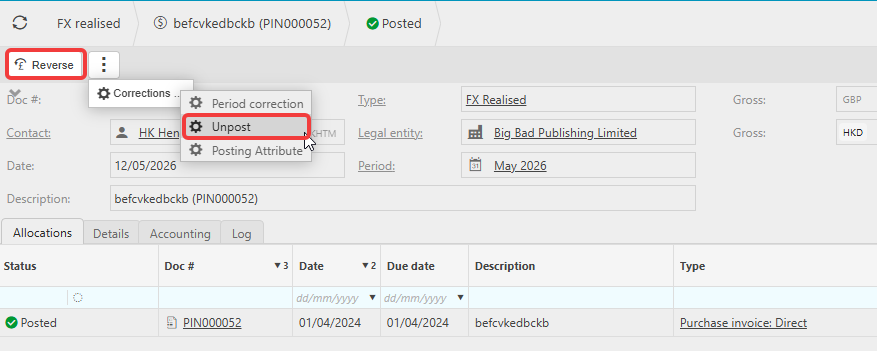
Unpost and abandon an FX Realised document
Use this route when the FX Realised document sits within an open period.
- Navigate to 'Period End' then select 'FX Realised'
- Find and open the FX Realised document you want to undo - search by contact name or description using the search bar, or use the filter icon for an advanced search
- Select 'Corrections'
- Select 'Unpost'
- Confirm by selecting 'Unpost' on the dialogue that appears
- Once unposted, select 'Abandon' to remove the document.
The FX Realised document is removed and the gain or loss entry is cleared from the General Ledger. You can now reprocess the FX Realised once the payment or allocation has been corrected.
Reverse an FX Realised document
Use this route when the FX Realised document sits within a closed or locked period. Reversing creates an equal and opposite entry in the General Ledger in the next open period to cancel out the original FX gain or loss.
- Navigate to 'Period End' then select 'FX Realised'
- Find and open the FX Realised document you want to reverse - search by contact name or description using the search bar, or use the filter icon for an advanced search
- Select 'Reverse'
- Enter a reason for the reversal and the reversal date
- Select 'Submit'.
The reversal is posted to the General Ledger. The original FX Realised document remains visible but is marked as reversed. You can now reprocess the FX Realised once the payment or allocation has been corrected.
Undo FX realised
Unpost FX realised
Remove FX gain/loss
Unallocate FX gain/loss
Reverse FX gain/loss