

This article covers how to confirm HMRC has received a VAT return submitted through Making Tax Digital (MTD). The confirmation lives on the Submissions tab of the MTD registration, not on the VAT return itself.
Confirming HMRC has received a VAT return
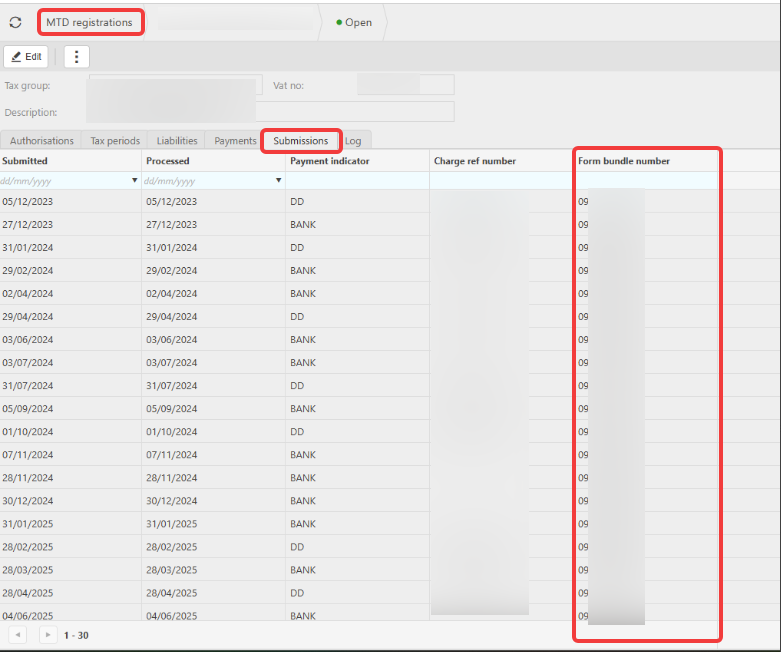
When a VAT return is submitted to HMRC through MTD, HMRC returns a form bundle number once they accept the submission. The form bundle number is the definitive proof HMRC has received the VAT return (sometimes called the submission receipt or confirmation number).
To check for the form bundle number on an MTD VAT return submission:
- Open the relevant MTD registration record
- Select the 'Submissions' tab
- Locate the row for the VAT period you are checking
- Review the 'Form bundle number' column
If the form bundle number is populated for that period, HMRC has received the submission. If the column is empty, HMRC has not yet acknowledged the submission.
Understanding the columns on the Submissions tab
Each row on the Submissions tab represents a VAT return submission for a specific period. The columns confirm different parts of the submission:
- Submitted - the date the VAT return was submitted to HMRC through MTD
- Processed - the date HMRC processed the submission
- Payment indicator - shows how the VAT liability will be paid, for example 'DD' for Direct Debit or 'BANK' for bank transfer
- Charge ref number - HMRC's reference for the VAT payment. This relates to the payment itself, not the submission of the return
- Form bundle number - HMRC's reference confirming receipt of the VAT return submission
VAT return submission
HMRC VAT Return submission received
Has my VAT gone to HMRC?
MTD submission status