

This article covers how to configure partial tax recovery in iplicit so that VAT on purchases is posted correctly when your organisation can only reclaim part - or none - of the input tax. There are two approaches: setting rates directly on the Tax Group using triggers such as Legal Entity, accounts or document type, or creating a named Partial Tax Band for more flexible, account-driven control. Both approaches are covered below.
When does partial tax apply?
Partial tax applies when your organisation makes both taxable and VAT-exempt supplies and can only reclaim a proportion of input VAT. This is most common in:
- Not-for-profit organisations
- Charities
- Educational institutions
- Organisations providing exempt services such as insurance, healthcare or financial services.
Once configured in iplicit, the recoverable percentage is applied automatically to qualifying purchase invoice lines. iplicit then posts the recoverable and irrecoverable portions to the General Ledger (GL) using the posting method you select.
Step 1: Enable partial tax on the Tax Group
Search for 'Tax groups' using the quick search, or navigate to Tax Groups.
- Open the Tax Group linked to the relevant Legal Entity and select 'Edit'
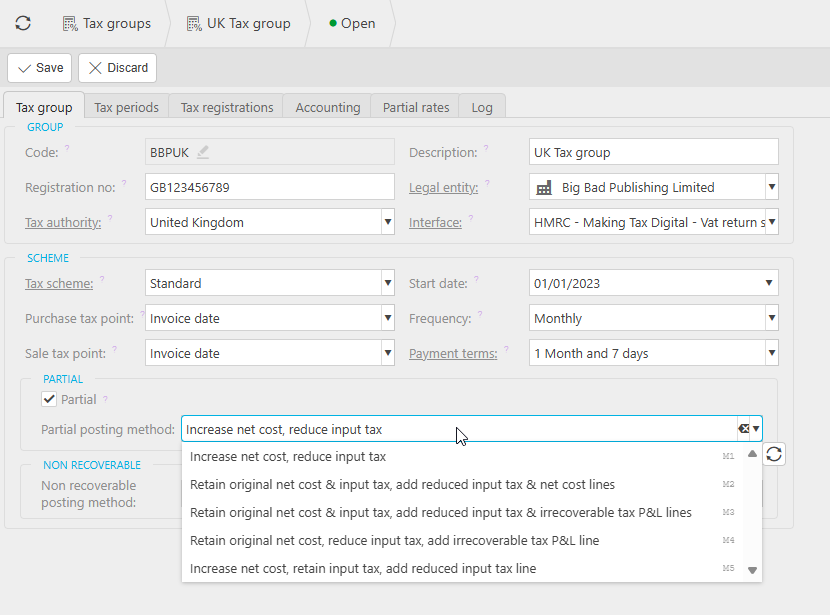
- Tick the 'Partial' checkbox - a 'Partial posting method' field and a 'Partial rates' tab will appear
- Select a posting method - this controls how iplicit splits the recoverable and irrecoverable portions in the GL.
There are five posting methods. All produce the same net financial result but structure the GL entries differently. Using a £120 gross purchase invoice (£100 net, £20 VAT, 50% recoverable) as an example:
- Method 1 - Increases the net cost by the irrecoverable amount and reduces the input tax line. Fewest GL lines
- Method 2 - Retains the original net and tax lines, then adds separate lines for the reduced input tax and adjusted net cost
- Method 3 - Retains the original net and tax lines, then adds a reduced input tax line and a separate irrecoverable tax P&L line
- Method 4 - Retains the original net cost, reduces the input tax line and adds an irrecoverable tax P&L line
- Method 5 - Retains the original net cost and full input tax line, then adds a reduced input tax line separately.
If you are unsure which method to use, confirm with your finance lead or accountant before saving.
- Save the Tax Group.
Step 2: Set recoverable percentage rates on the Partial Rates tab
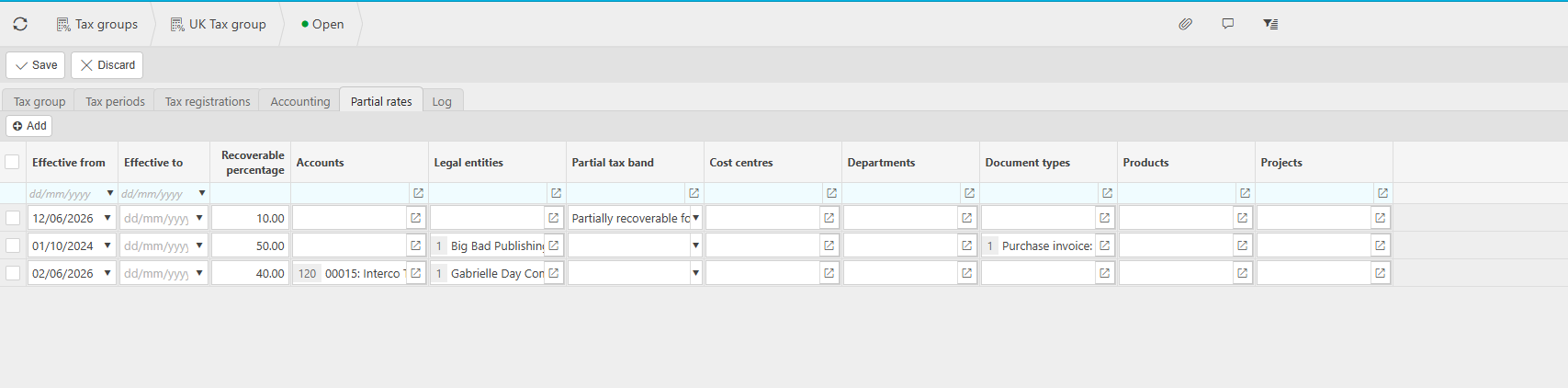
Open the 'Partial Rates' tab on the Tax Group. This is where you define what percentage of VAT is recoverable and the conditions under which each rate applies.
- Select 'Add' to create a new rate line
- Enter the recoverable percentage - for example, enter 50 for 50% recovery
- Set an 'Effective from' date. An 'Effective to' date is optional
- Optionally, restrict the rate to one or more of the following attributes so it only applies when those conditions are met on an invoice line:
- Accounts (Chart of Accounts)
- Legal Entity
- Partial Tax Band
- Cost Centre
- Department
- Funds
- Products
- Project.
- Save the rate line.
You can add as many rate lines as needed to reflect different rates for different conditions or time periods. iplicit applies the correct rate based on the tax date of each individual invoice line.
Using a Partial Tax Band for account-driven control (optional)
A Partial Tax Band gives you more flexibility than using account ranges directly as a trigger. Instead of listing individual accounts on each rate line, you create a named band, assign a rate to it in the Tax Group, and then use a Chart of Accounts (COA) rule to apply that band automatically whenever a matching account is used on an invoice line.
This approach is useful when you want partial tax to apply consistently across specific accounts without relying on users to select the correct rate manually. This allows you the flexibility to have multiple tax bands against a singular account code.
Creating a Partial Tax Band
- Search for 'Partial tax band' using the quick search
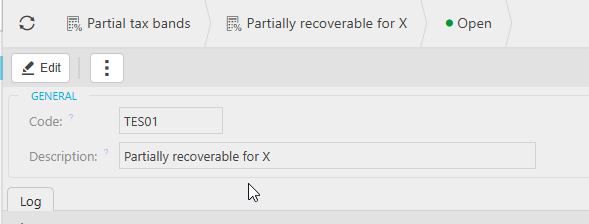
- Select 'New' and give the band a name - for example, 'Partially recoverable - 10%'
- Save the band.
Adding the Partial Tax Band to the Tax Group
- Return to the Tax Group and open the 'Partial Rates' tab
- Add a new rate line, enter the recoverable percentage and set the effective date
- In the 'Partial Tax Band' column, select the band you just created
- Save the rate line.
Setting up the COA rule to drive the band automatically
- Navigate to the Chart of Account rules screen
- Open or create the relevant COA rule
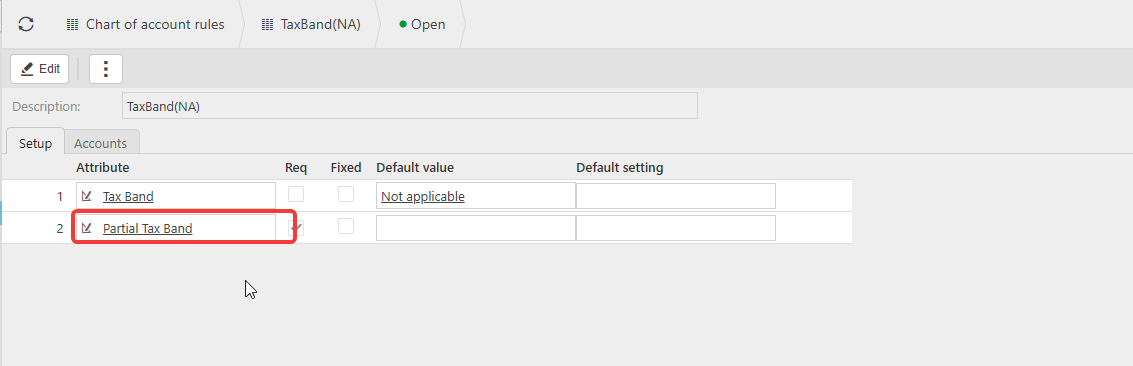
- Add 'Partial Tax Band' as an attribute
- Set it as 'Required' if you want users to be forced to select a band on every matching invoice line, or 'Optional' if you want it to be available but not mandatory
- Set the default value to the Partial Tax Band you created if you want it to populate automatically
- Save the rule.
Once the COA rule is in place, any invoice line coded to a matching account will have the Partial Tax Band applied automatically. iplicit then looks up the recoverable rate for that band from the Tax Group and applies it to the line - no need for users to manually select a rate or tick 'Partial tax ignore'.
What happens on documents after setup
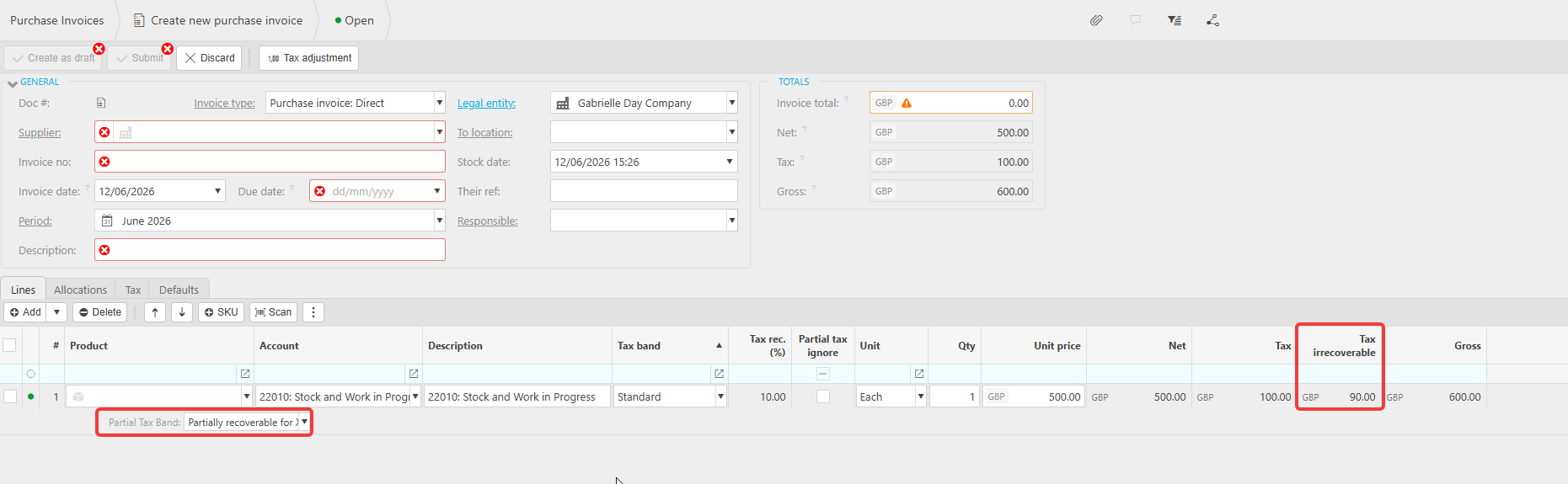
Once partial tax rates are saved, any new purchase invoice line that matches the configured criteria will display a 'Tax rec.(%)' field showing the recoverable percentage being applied. iplicit posts the recoverable and irrecoverable portions automatically using the posting method selected in Step 1.
Individual lines can be excluded from partial tax by ticking 'Partial tax ignore' on that line. This reverts the line to the full tax rate as specified under the tax band. Access to this field should be restricted to appropriate users via user access settings.
What about documents already posted before setup?
Partial tax configuration only applies to documents created after setup is complete. For purchase invoices already posted before partial tax was configured, the recommended approach is to raise a manual journal to adjust the VAT split in the GL.
Partial Tax Bands
Set up recoverable
Flexible VAT partial
COA rule partial rate
Chart of account for partial