

This article covers why financial statements and General Ledger views in iplicit may still display the previous year after completing the year-end rollover. The most common cause is that the financial year group has not been updated to reflect the new current year.
Why this happens
The financial year group controls which year displays by default across the General Ledger and financial statements. It can also drive default financial periods. After a year-end rollover, the financial year group still points to the previous year until you update it manually – it does not update automatically.
Updating the financial year group
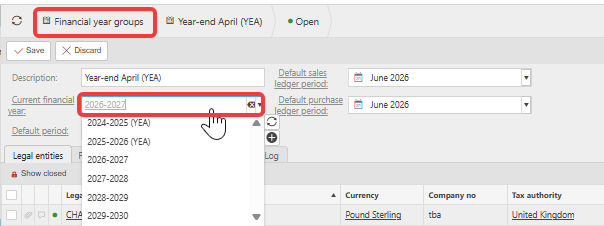
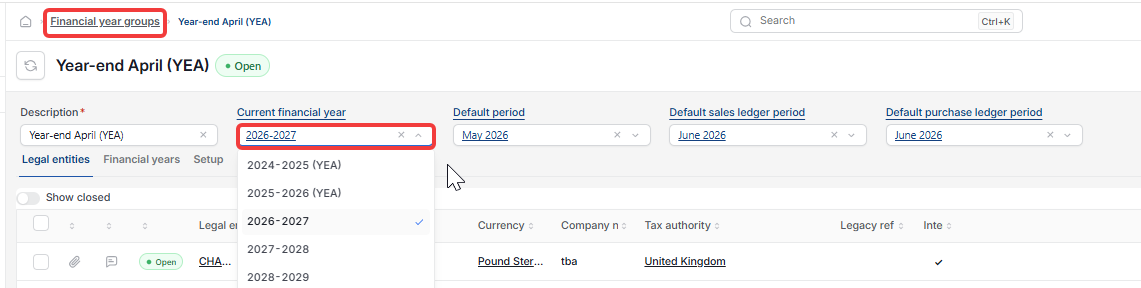
- Navigate to Financial Year Groups
- Double-click the relevant group
- Click 'Edit'
- Change the 'Current financial year' dropdown to the correct year
- Click 'Save' and reload the page.
Financial statements and General Ledger views now reflect the updated year.
If financial statements still show last year after updating
If updating the financial year group does not resolve the issue, check that the year-end rollover journal has been submitted and posted. An unposted rollover journal means brought-forward balances are not yet live. See 'Why hasn't my year-end rollover journal posted after completing the year-end rollover'.
If a financial year is missing from the financial years screen
If you cannot find a financial year on the financial years screen, it may be locked and hidden. See 'How to set up a new financial year in iplicit'.
Still can't see the year?
If neither cause resolves the issue, check that your user permissions include access to the relevant legal entity, and that the legal entity has the correct financial year group assigned.
If you need help running the year-end rollover process itself, see the 'year-end help guide'.
Missing financial year
Wrong financial year showing
Cannot locate financial year
Year end rollover not finalised
Unlock financial year