

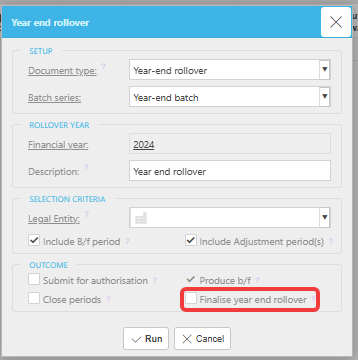
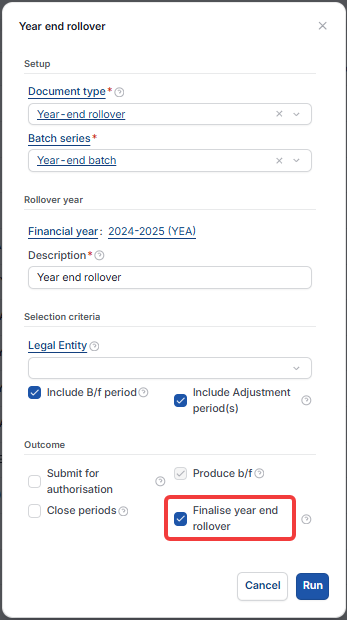
This article covers a specific issue within iplicit's year-end rollover process where brought-forward figures on balance sheet General Ledger codes appear doubled. This occurs when the 'Finalise year end rollover' option has not been ticked in the financial year settings. Without this, iplicit treats the balances as still pending and includes both the previous and current year's balance sheet totals in the rollover journal.
Why the figures are doubling
The 'Finalise year end rollover' setting locks the balance sheet figures into the brought-forward period of the financial year being closed. If it is not ticked, iplicit does not lock the prior year balances, and the rollover journal picks up both years' figures – causing the doubling effect on your balance sheet General Ledger codes.
Resolving the doubling brought-forward figures
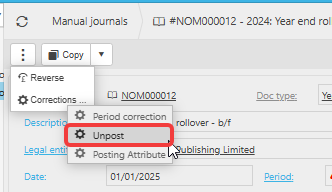
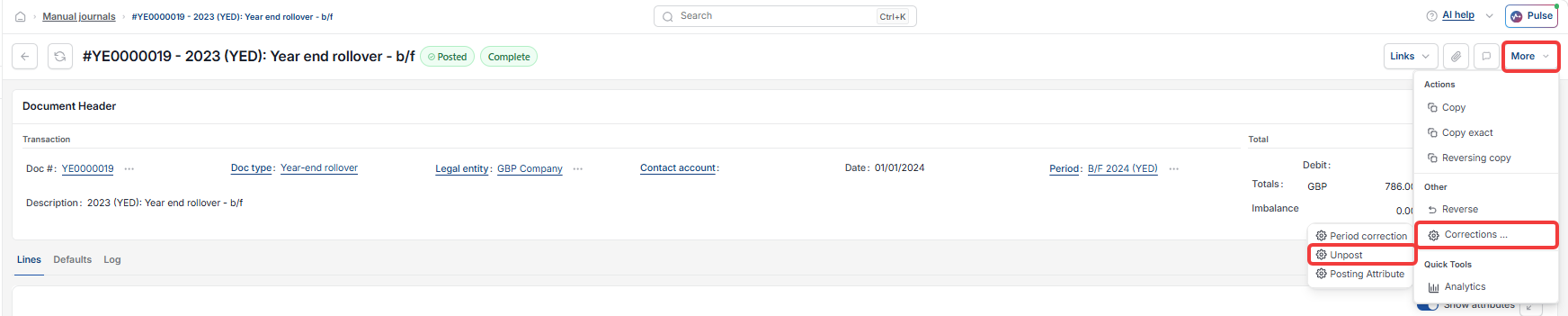
- Navigate to Manual Journals and locate the year-end rollover journal
- Select the journal, open the menu within the three dots or more menu and click 'Corrections' then choose 'Unpost'
- Confirm by selecting 'Unpost' in the pop-up window
- Select 'Abandon' to discard the journal
- Navigate to the Financial Year screen and double-click the relevant previous financial year
- Click 'Edit'
- Locate the 'Year end rollover' option and ensure it is ticked
- Click 'Save'
- Navigate to the current financial year and click 'Year End' to regenerate the rollover journal.
iplicit generates one rollover journal per legal entity based on your legal entity selection. For guidance on selecting legal entities during the rollover, see 'Can I run the year-end rollover for more than one legal entity?'
B/F figures doubling
Year end rollover duplicate balances
Abandon year end rollover
Carried forward figures wrong