

This article covers how to post a VAT payment or refund to your VAT liability account using a cash journal in the Bank module. Use this process after you have submitted your VAT return and are ready to record the payment to or from HMRC. If your VAT liability account is not yet configured, see How to set up a VAT liability account code in the Chart of Accounts before continuing.
Before you start
To raise a cash journal for a VAT payment, your VAT liability account code must have the 'Sale' and 'Purchase' usage flags ticked in the Chart of Accounts. If the account does not appear as an option in the cash journal lines, this is the most likely cause.
Posting a VAT payment to HMRC using a cash journal
A cash journal records the movement of money directly from your bank account. When you pay your VAT to HMRC, you raise a withdrawal cash journal coded to your VAT liability account. When HMRC issues a refund, you raise a deposit cash journal instead.
- Navigate to Bank > Cash Journals
- Select 'New'
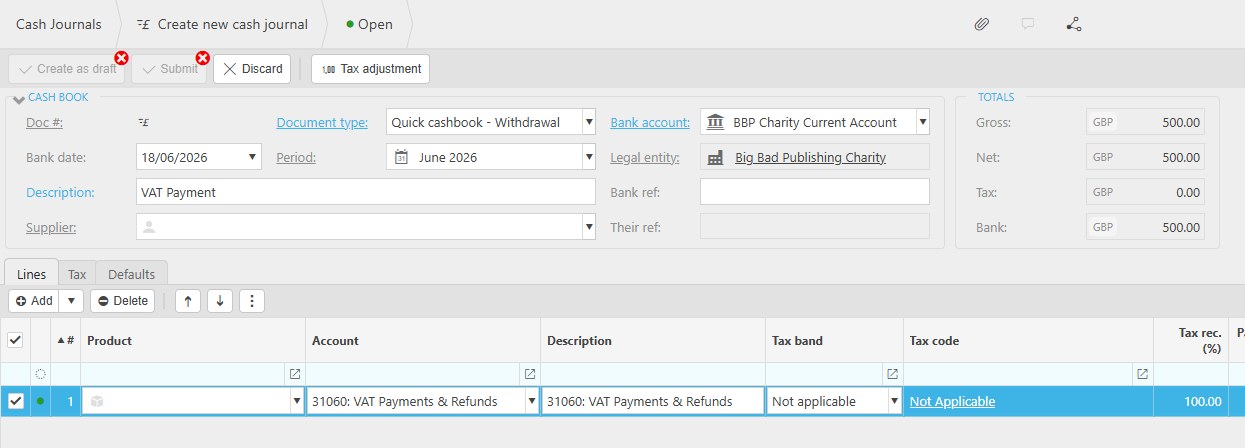
- Select the appropriate document type from the dropdown – use a withdrawal for a VAT payment to HMRC, or a deposit for a VAT refund from HMRC
- Enter the bank account the payment is being made from or received into
- Enter a description, for example: 'VAT payment – [period]' or 'VAT refund – [period]'
- Enter the bank date and period
- Enter a bank reference to identify the transaction
- In the journal lines, enter the following:
- 'Account' – select your VAT liability account code (for example, 31060: VAT Payments & Refunds)
- 'Description' – enter a description for the line
- 'Tax band' – select the appropriate tax band usually 'Not applicable'
- Enter the amount of the VAT payment or refund
- Select 'Submit' to post the cash journal
The cash journal will post the amount to your VAT liability account in the General Ledger, clearing the balance created when your VAT return was submitted.
Post VAT payment
VAT payment cash journal
Pay VAT HMRC
VAT refund cash journal
Record VAT payment
Cash journal VAT liability
Pay VAT return iplicit