

This article covers the Aged creditors enquiry in the Reporting area of iplicit, on the Suppliers tab. By default, this enquiry excludes draft and disputed transactions, which is the most common reason expected transactions don't appear.
Why transactions are missing from the Aged creditors enquiry
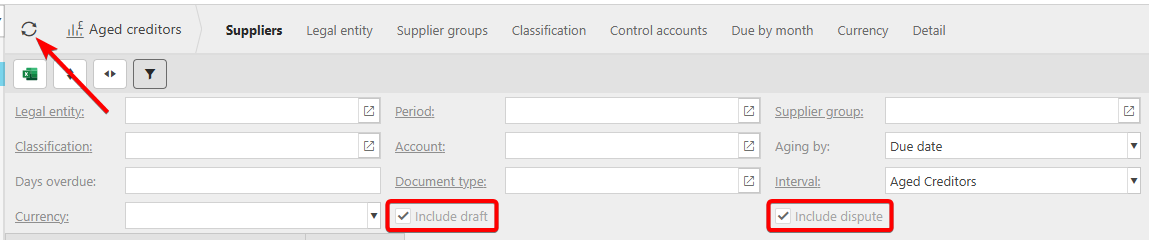
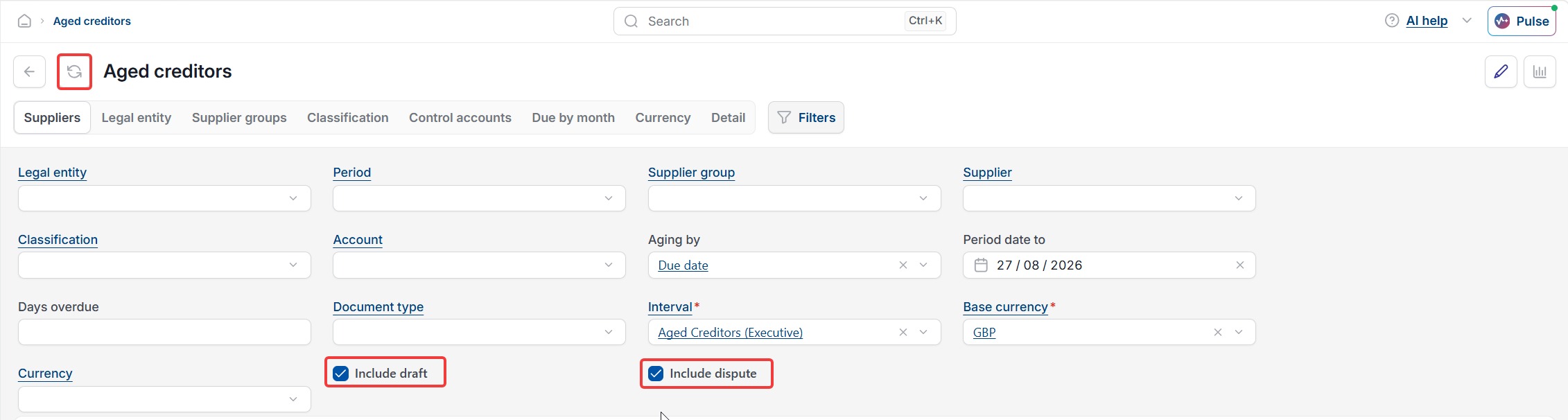
The Aged creditors enquiry, sometimes called the aged creditor report or supplier ageing report, hides draft and disputed transactions unless you tell it not to. On the filter panel, this is controlled by two tick boxes: 'Include draft' and 'Include dispute'. If a transaction you expect to see is still in draft status, or has been marked as disputed, it won't appear on the Aged creditors enquiry until these are ticked.
Including draft and disputed transactions on the Aged creditors enquiry
To bring draft and disputed transactions into the Aged creditors enquiry:
- Go to the Aged creditors enquiry on the Suppliers tab
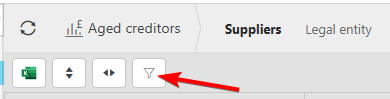
- Select the filter icon to open the available filters
- Tick 'Include draft' and 'Include dispute' as needed
- Select the refresh icon to update the enquiry with the new filters.
Once refreshed, the Aged creditors enquiry will include any draft and disputed transactions that match your other filter criteria.
If the Aged creditors enquiry still doesn't match figures elsewhere, such as your creditors control account, this is usually down to filters, control account settings, or posting differences rather than the draft or dispute settings covered here.

Aged creditors missing transactions
Aged creditor report
Aged creditors enquiry incomplete
Draft transactions not showing
Disputed transactions not showing
Include draft
Include dispute
Suppliers enquiry missing invoices