

This article covers keyboard shortcuts, search acronyms and favouriting screens in iplicit, correct as of December 2025. iplicit currently supports two keyboard shortcuts: holding 'Ctrl' to drill through into a related record and, depending on your screen, pressing 'Ctrl + K' to open the quick search.
Keyboard shortcuts in iplicit
iplicit supports the following keyboard shortcuts:
- Ctrl + select a linked field – drills through into that record directly, for example opening a document type from an invoice's 'Invoice type' field
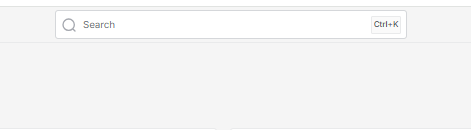
- Ctrl + K – opens the quick search at the top of the screen, so you can search for a screen or record without using your mouse. If your screen has a search bar at the top showing 'Ctrl+K', like the one below, you can use this shortcut.
No other keyboard shortcuts are supported.
Searching using acronyms
The search feature accepts acronym values as well as full names – for example, 'DEC' for 'Data Entry Control' or 'FA' for 'Fixed Assets'. The full list of accepted acronyms for each screen can be viewed in the 'Keywords' column on the menu structure screen.
Saving a screen as a favourite
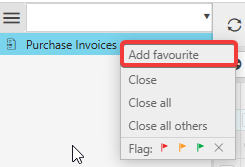
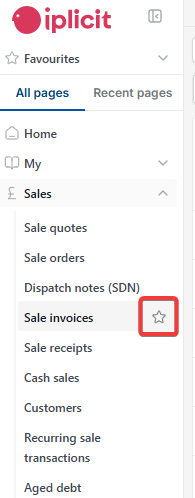
Depending on your screen, either right-click the item's title on the left-hand menu and select 'Add favourite', or select the star icon next to the screen's name on the left-hand menu.
Finding your favourited and recently viewed screens
Once a screen has been added as a favourite, you can find it again, along with a list of recently viewed pages.
Depending on your screen, this is either:
- Using two icons in the bottom-left corner of the screen – the star icon shows your favourited screens, and the icon to its right shows a list of recently viewed pages
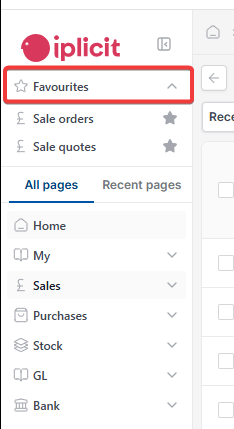
- Using the 'Favourites' section at the top of the left-hand menu, which lists your favourited screens directly, alongside an 'All pages' and 'Recent pages' tab further down the same menu for browsing everything else, including recently viewed pages.

Keyboard shortcuts iplicit
Ctrl click drill through
Ctrl K quick search
Favourite screens iplicit
Search acronyms iplicit
Recently viewed pages