

This article covers setting up partial tax recovery on the Tax Group, so VAT on purchase documents posts correctly when your organisation can only reclaim part or none of the input tax. Two approaches are covered: setting rates directly on the Tax Group, or creating a named Partial Tax Band for account-driven control.
When does partial tax recovery apply?
Partial tax recovery applies when your organisation makes both taxable and VAT-exempt supplies and can only reclaim a proportion of input VAT. This is most common in:
- Not-for-profit organisations
- Charities
- Educational institutions
- Organisations providing exempt services such as insurance, healthcare or financial services.
Once partial tax recovery is configured, iplicit applies the recoverable percentage automatically to qualifying purchase invoice lines, then posts the recoverable and irrecoverable portions to the General Ledger using the posting method you select.
Enabling partial tax recovery on the Tax Group
- Search for 'Tax Groups' using quick search, or navigate to Tax Groups
- Open the Tax Group linked to the relevant Legal Entity and select 'Edit'
- Tick the 'Partial' checkbox. A 'Partial Posting Method' field and a 'Partial Rates' tab appear
- Select a Partial Posting Method. This controls how iplicit splits the recoverable and irrecoverable portions in the GL
- Save the Tax Group.
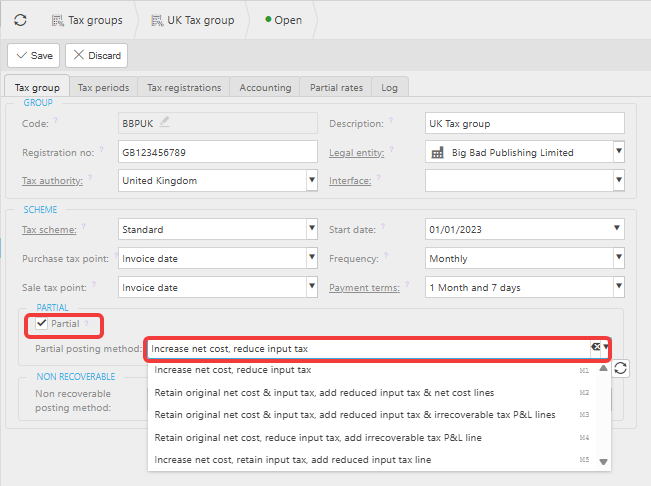
Choosing a Partial Posting Method for partial tax recovery
There are five Partial Posting Methods. All five produce the same net financial result but structure the GL entries differently. The example below uses a £120 gross purchase invoice (£100 net, £20 VAT, fifty per cent recoverable):
- Method 1 – increases the net cost by the irrecoverable amount and reduces the input tax line, producing the fewest GL lines
- Method 2 – retains the original net and tax lines, then adds separate lines for the reduced input tax and adjusted net cost
- Method 3 – retains the original net and tax lines, then adds a reduced input tax line and a separate irrecoverable tax P&L line
- Method 4 – retains the original net cost, reduces the input tax line and adds an irrecoverable tax P&L line
- Method 5 – retains the original net cost and full input tax line, then adds a reduced input tax line separately.
If you are unsure which Partial Posting Method to use, confirm with your finance lead or accountant before saving the Tax Group.
Setting recoverable percentage rates on the Partial Rates tab
The 'Partial Rates' tab on the Tax Group is where you define what percentage of VAT is recoverable for partial tax recovery, and the conditions under which each rate applies.
- Open the 'Partial Rates' tab on the Tax Group
- Select 'Add' to create a new rate line
- Enter the recoverable percentage – for example, enter 50 for fifty per cent recovery
- Set an 'Effective from' date. An 'Effective to' date is optional
- Optionally, restrict the rate to one or more attributes so it only applies when those conditions are met on an invoice line: Accounts (Chart of Accounts), Legal Entity, Partial Tax Band, Cost Centre, Department, Funds, Products or Project
- Save the rate line.
You can add as many partial tax rate lines as needed to reflect different rates for different conditions or time periods. iplicit applies the correct rate based on the tax date of each individual invoice line.
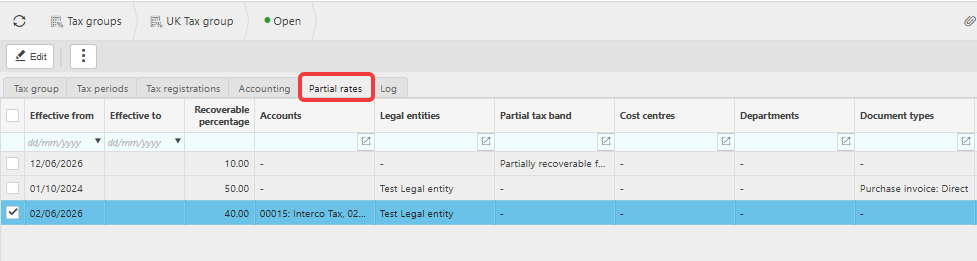
Using a Partial Tax Band for account-driven partial tax recovery (optional)
A Partial Tax Band gives more flexibility than using account ranges directly as a trigger. Instead of listing individual accounts on each rate line, you create a named band, assign a rate to it on the Tax Group, then use a Chart of Accounts (COA) rule to apply that band automatically whenever a matching account is used on an invoice line. This also allows multiple partial tax bands against a single account code.
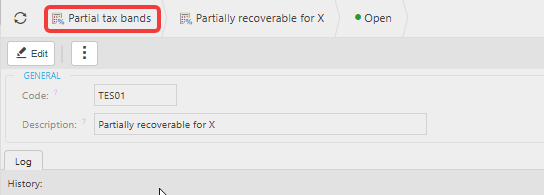
Creating a Partial Tax Band
- Search for 'Partial Tax Band' using quick search
- Select 'New' and name the band – for example, 'Partially recoverable – 10%'
- Save the band.
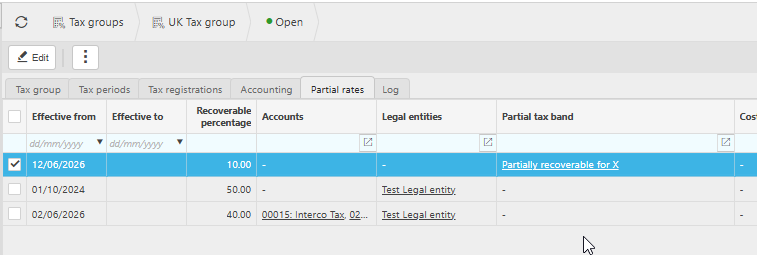
Adding the Partial Tax Band to the Tax Group
- Return to the Tax Group and open the 'Partial Rates' tab
- Add a new rate line, enter the recoverable percentage and set the effective date
- In the 'Partial Tax Band' column, select the band you created
- Save the rate line.
Setting up the Chart of Accounts rule to drive the Partial Tax Band automatically
- Navigate to the Chart of Accounts rules screen
- Open or create the relevant Chart of Accounts rule
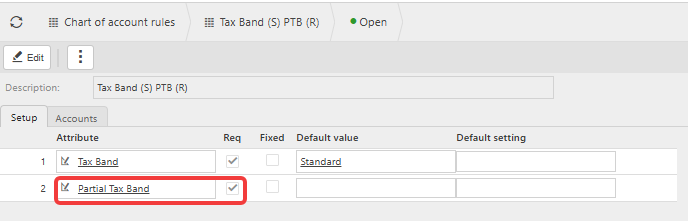
- Add 'Partial Tax Band' as an attribute
- Set it to 'Required' to force users to select a band on every matching invoice line, or 'Optional' to make it available but not mandatory
- Set the default value to the Partial Tax Band you created, if you want it to populate automatically
- Save the rule.
Once the Chart of Accounts rule is in place, any invoice line coded to a matching account has the Partial Tax Band applied automatically, and iplicit looks up the recoverable rate for that band without users needing to select a rate manually.
What happens on purchase invoices after partial tax recovery is set up?
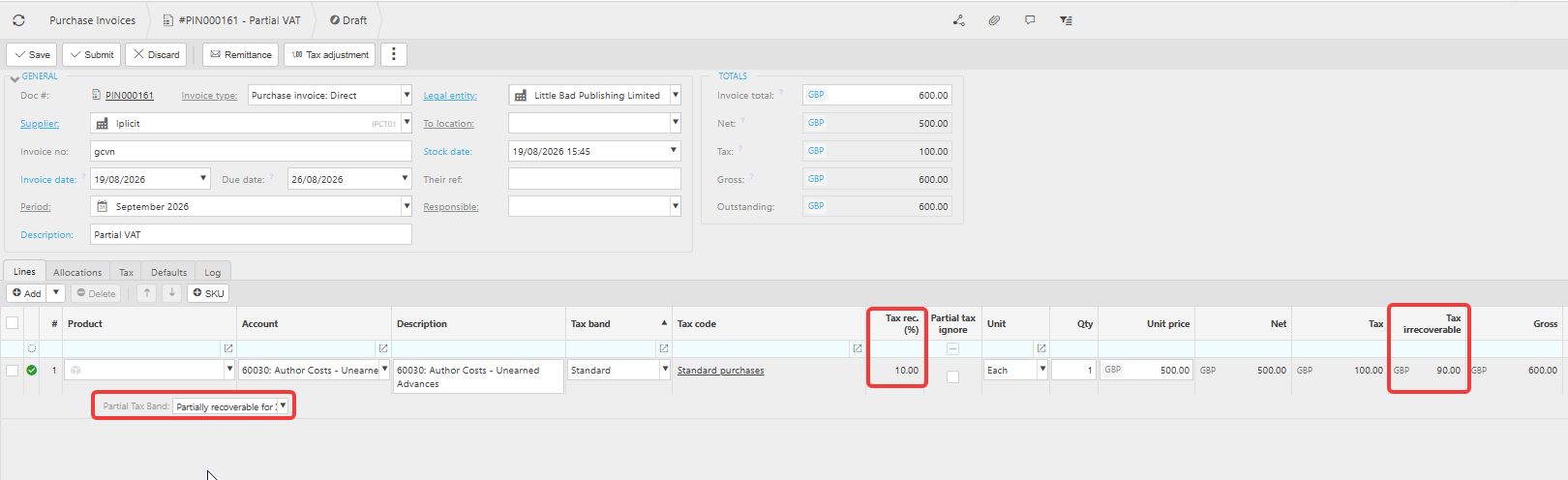
Once partial tax rates are saved, any new purchase invoice line matching the configured criteria displays a 'Tax rec.(%)' field showing the recoverable percentage applied. iplicit posts the recoverable and irrecoverable portions automatically using the Partial Posting Method selected earlier.
To exclude an individual line from partial tax recovery, tick 'Partial Tax Ignore' on that line. This reverts the line to the full tax rate specified under the tax band. For a worked example, see How to apply a partial VAT rate to a single line on a purchase invoice.
Access to the 'Partial Tax Ignore' field should be restricted to appropriate users through user access settings.
What about documents already posted before partial tax recovery was set up?
Partial tax recovery only applies to documents created after setup is complete. For purchase invoices already posted before setup, raise a manual journal to adjust the VAT split in the General Ledger.
Partial tax bands
Set up recoverable VAT
Flexible VAT partial
COA rule partial rate
Chart of account for partial tax
Partial tax recovery setup
Non-recoverable VAT setup