

This article covers how an admin user can approve a document on behalf of another user when the assigned approver is unavailable - for example when they are on holiday, on leave, or no longer with the organisation. Admin approval is performed from the pending authorisation screen and requires the 'Authorisation Manager' permission on the admin user account.
Admin approval is recorded in the document log so the override is fully auditable.
For a planned absence where the approver knows in advance they will be unavailable, workflow substitution is usually the better option. See 'How can I assign someone to approve my documents while I'm on holiday/leave?' for that approach.
Approving a document as an admin from the pending authorisation screen
Admin approval relies on the 'Authorisation Manager' permission. If this permission is not assigned to your user account, the pending authorisation screen will not appear.
- Confirm your user account has the 'Authorisation Manager' permission assigned. If you are unsure, ask another iplicit administrator to check
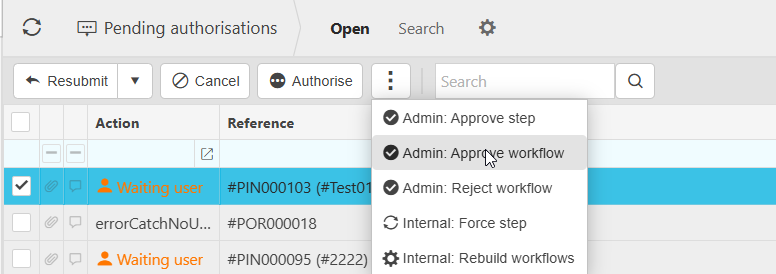
- Open the pending authorisation screen
- Locate the document awaiting approval
- Choose whether to approve a single workflow step or the entire workflow
- Approve the step or workflow as required.
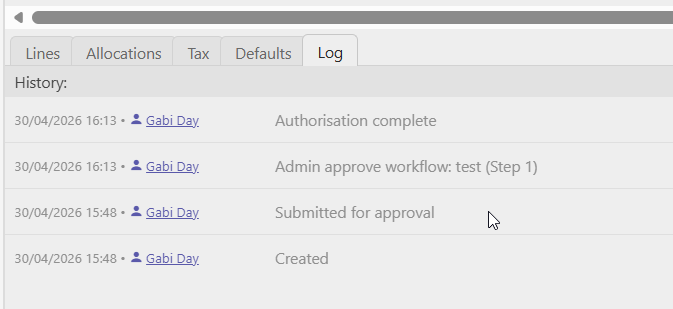
The document will progress as if the original approver had actioned it, and the document log will record the action as an admin approval.
How admin approval appears in the document log
Every admin approval is recorded against the document so the override remains auditable.
- The document log shows the approval as an admin approval, identifying it as an admin rather than a standard approval
- The user account that performed the admin approval is recorded against the entry
- The workflow step is still visible in the log for context.
This means audit and finance review processes can clearly distinguish between routine approvals and admin overrides.
When admin approval is not the right option
Admin approval is intended for situations where the assigned approver cannot action the workflow themselves. It is not the right option in every case.
- Use workflow substitution when the approver knows in advance they will be unavailable. This routes documents to a nominated substitute rather than relying on an admin override
- Review the workflow configuration if admin overrides are happening regularly, as this usually signals that the workflow setup needs adjusting (for example, missing alternative approvers).
Override workflow approver
Approve on behalf of someone
Admin approval
Admin rejection
Pending authorisations