

This article covers accessing the iplicit customer support portal from within the iplicit application. For logging in and resetting your password once you're on the portal, see 'How to log in to the support portal and reset your password'.
Accessing the support portal from iplicit
You reach the iplicit customer support portal directly from within the iplicit application, rather than by email.
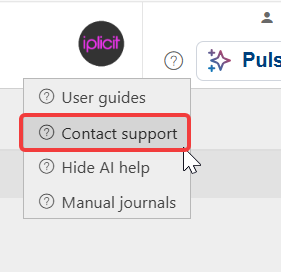
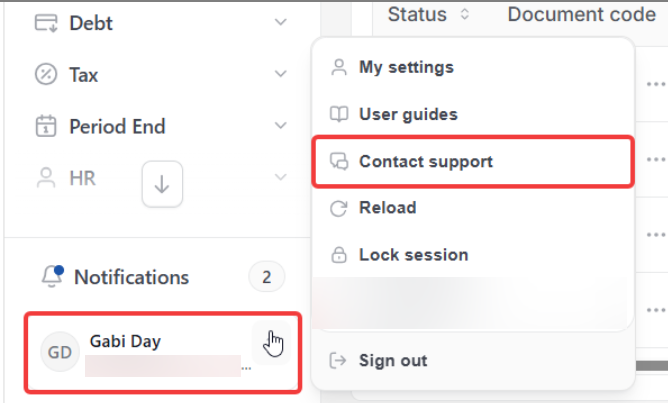
- Depending on your screen, access support from the question mark in top right of your screen, or from the menu next to your username in the bottom left
- Select 'Contact Support'.
iplicit redirects you straight to the customer support portal, so you no longer need to email support directly.
Screenshots for Legacy UI (before October 2026)
Screenshots for New UI (post October 2026)
What you can do on the support portal
Once you're on the support portal, you can:
- Search the knowledge base for help on a specific topic
- Browse knowledge base articles by category
- Log in to report an issue or check an existing ticket
- Access training videos and customer webinars
- Check the current status of the iplicit service
- Read the latest release notes
- Open the user guide
- Open the iplicit API documentation.