

This article covers setting up Reverse Charge VAT for a supplier whose Tax Authority is different from your legal entity's Tax Authority, for example an overseas supplier invoicing a UK entity. This is a separate mechanism from the Domestic Reverse Charge (DRC) scheme for UK and Irish construction and subcontracting under CIS - see Domestic Reverse Charge (DRC): setup and processing guide for the UK and Ireland if that's what you need.
What is this Reverse Charge for?
This Reverse Charge rule applies when a supplier's Tax Authority is different from your legal entity's Tax Authority - for example, an overseas supplier invoicing a legal entity registered in the United Kingdom. This is a different scheme to the Domestic Reverse Charge (DRC) used for construction and subcontracting under CIS, where the supplier and legal entity share the same Tax Authority rather than a different one.
Setting up a supplier for Reverse Charge VAT
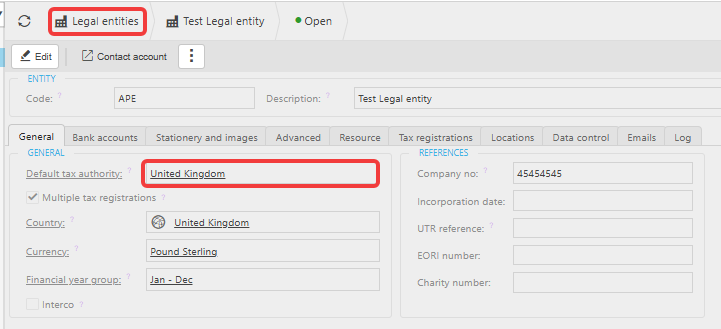
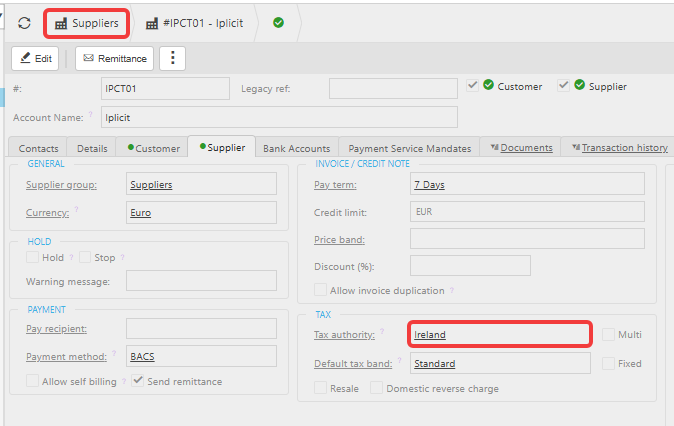
- Open the supplier record and confirm the 'Tax Authority' is different from your legal entity's 'Tax Authority' – for example, the legal entity is set to United Kingdom and the supplier is set to a different country
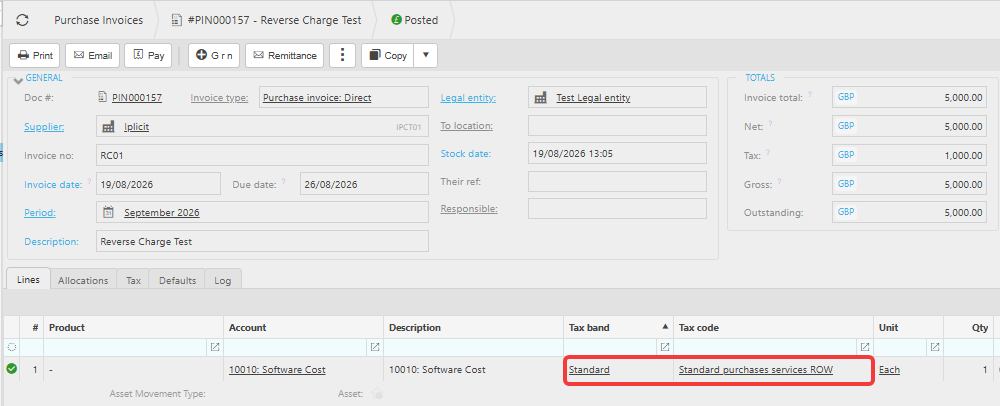
- Apply the 'Standard Rate' or 'Reduced Rate' tax band to the Purchase Invoice.
How iplicit calculates the tax on a Reverse Charge invoice
If the invoice you have received from the supplier already includes tax, enter the Invoice total exactly as shown on the supplier's invoice.
iplicit sets the Gross amount equal to the Invoice total, then calculates the Tax backwards from the Gross amount.

How Reverse Charge VAT appears on your VAT return
Reverse Charge VAT affects four boxes on your VAT return, because the transaction is recorded on both sides at once.
- The tax element appears in Box 1 and Box 3 as a credit
- Box 4 as a debit
- The value of the goods or services appears in either Box 6 as a credit or in Box 7 as a debit.
This double-sided treatment is what makes Reverse Charge VAT net to zero on the return while still declaring the transaction correctly.
Reverse charge VAT supplier
Reverse charge different tax authority
Cross border reverse charge VAT
Reverse charge tax band
Reverse charge VAT calculation